<?xml version="1.0" encoding="utf-8"?>
<feed xmlns="http://www.w3.org/2005/Atom">
    <id>https://help.omegaai.com/es/newsletter</id>
    <title>OmegaAI User Guide Blog</title>
    <updated>2026-05-29T00:00:00.000Z</updated>
    <generator>https://github.com/jpmonette/feed</generator>
    <link rel="alternate" href="https://help.omegaai.com/es/newsletter"/>
    <subtitle>OmegaAI User Guide Blog</subtitle>
    <icon>https://help.omegaai.com/es/img/favicon.ico</icon>
    <entry>
        <title type="html"><![CDATA[May 2026]]></title>
        <id>https://help.omegaai.com/es/newsletter/2026-may</id>
        <link href="https://help.omegaai.com/es/newsletter/2026-may"/>
        <updated>2026-05-29T00:00:00.000Z</updated>
        <summary type="html"><![CDATA[Customizable image-viewer hotkeys, a mobile worklist and viewer, and a release-updates notification center in OmegaAI, plus Blume biometric login and synced appointment statuses.]]></summary>
        <content type="html"><![CDATA[<p>This issue covers what shipped in May 2026 across OmegaAI, Blume, and PowerServer: new features, resolved issues, and a preview of what's coming next.</p>
<div class="theme-admonition theme-admonition-tip admonition_xJq3 alert alert--success"><div class="admonitionHeading_Gvgb"><span class="admonitionIcon_Rf37"><svg viewBox="0 0 12 16"><path fill-rule="evenodd" d="M6.5 0C3.48 0 1 2.19 1 5c0 .92.55 2.25 1 3 1.34 2.25 1.78 2.78 2 4v1h5v-1c.22-1.22.66-1.75 2-4 .45-.75 1-2.08 1-3 0-2.81-2.48-5-5.5-5zm3.64 7.48c-.25.44-.47.8-.67 1.11-.86 1.41-1.25 2.06-1.45 3.23-.02.05-.02.11-.02.17H5c0-.06 0-.13-.02-.17-.2-1.17-.59-1.83-1.45-3.23-.2-.31-.42-.67-.67-1.11C2.44 6.78 2 5.65 2 5c0-2.2 2.02-4 4.5-4 1.22 0 2.36.42 3.22 1.19C10.55 2.94 11 3.94 11 5c0 .66-.44 1.78-.86 2.48zM4 14h5c-.23 1.14-1.3 2-2.5 2s-2.27-.86-2.5-2z"></path></svg></span>At a glance</div><div class="admonitionContent_BuS1"><p><strong>7</strong> new features and enhancements, <strong>8</strong> resolved issues, <strong>3</strong> coming next month.</p></div></div>
<hr>
<h2 class="anchor anchorTargetStickyNavbar_Vzrq" id="this-months-product-updates">This Month's Product Updates<a href="https://help.omegaai.com/es/newsletter/2026-may#this-months-product-updates" class="hash-link" aria-label="Enlace directo al This Month's Product Updates" title="Enlace directo al This Month's Product Updates" translate="no">​</a></h2>
<h3 class="anchor anchorTargetStickyNavbar_Vzrq" id="image-viewer-hotkey-customizations"><a class="" href="https://help.omegaai.com/es/blog/Hotkey_releasenote">Image Viewer Hotkey Customizations</a><a href="https://help.omegaai.com/es/newsletter/2026-may#image-viewer-hotkey-customizations" class="hash-link" aria-label="Enlace directo al image-viewer-hotkey-customizations" title="Enlace directo al image-viewer-hotkey-customizations" translate="no">​</a></h3>
<span style="background:#5465FE;color:#fff;padding:2px 9px;border-radius:11px;font-size:0.72em;font-weight:700;margin-right:5px;white-space:nowrap;vertical-align:middle">OmegaAI</span>
<p>Customize Image Viewer and Document Viewer hotkeys to match how you work. Map the tools you use most to the keys you prefer and move through studies faster.</p>
<h3 class="anchor anchorTargetStickyNavbar_Vzrq" id="mobile-worklist--image-viewer"><a class="" href="https://help.omegaai.com/es/docs/Worklist/worklist_omegaai">Mobile Worklist &amp; Image Viewer</a><a href="https://help.omegaai.com/es/newsletter/2026-may#mobile-worklist--image-viewer" class="hash-link" aria-label="Enlace directo al mobile-worklist--image-viewer" title="Enlace directo al mobile-worklist--image-viewer" translate="no">​</a></h3>
<span style="background:#5465FE;color:#fff;padding:2px 9px;border-radius:11px;font-size:0.72em;font-weight:700;margin-right:5px;white-space:nowrap;vertical-align:middle">OmegaAI</span>
<p>Sign in from a mobile browser to see a streamlined Worklist and Image Viewer built for the smaller screen. Rolling out gradually, so availability may vary as access expands.</p>
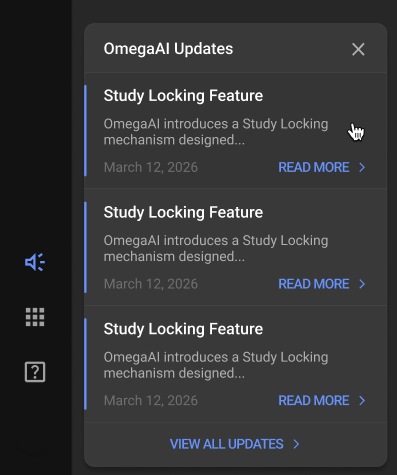
<h3 class="anchor anchorTargetStickyNavbar_Vzrq" id="release-updates-notification-center"><a class="" href="https://help.omegaai.com/es/docs/OmegaAI-Homepage/omegaai_homepage">Release Updates Notification Center</a><a href="https://help.omegaai.com/es/newsletter/2026-may#release-updates-notification-center" class="hash-link" aria-label="Enlace directo al release-updates-notification-center" title="Enlace directo al release-updates-notification-center" translate="no">​</a></h3>
<span style="background:#5465FE;color:#fff;padding:2px 9px;border-radius:11px;font-size:0.72em;font-weight:700;margin-right:5px;white-space:nowrap;vertical-align:middle">OmegaAI</span>
<p>A new in-app panel shows your most recent product updates in reverse-chronological order, highlights what you have not seen, and links each one to its help article.</p>
<p><img decoding="async" loading="lazy" alt="The Release Updates notification panel in OmegaAI" src="https://help.omegaai.com/es/assets/images/notification-center-a38e2eba180a84b1ff562f87f99ac224.png#bordered" width="397" height="475" class="img_ev3q"></p>
<h3 class="anchor anchorTargetStickyNavbar_Vzrq" id="blume--omegaai-appointment-status-sync"><a class="" href="https://help.omegaai.com/es/docs/Blume-Patient-Portal/Blumestatusrestructure#status-behaviour-and-sync-rules">Blume &amp; OmegaAI Appointment Status Sync</a><a href="https://help.omegaai.com/es/newsletter/2026-may#blume--omegaai-appointment-status-sync" class="hash-link" aria-label="Enlace directo al blume--omegaai-appointment-status-sync" title="Enlace directo al blume--omegaai-appointment-status-sync" translate="no">​</a></h3>
<span style="background:#8BD96E;color:#1B264C;padding:2px 9px;border-radius:11px;font-size:0.72em;font-weight:700;margin-right:5px;white-space:nowrap;vertical-align:middle">Blume</span>
<span style="background:#5465FE;color:#fff;padding:2px 9px;border-radius:11px;font-size:0.72em;font-weight:700;margin-right:5px;white-space:nowrap;vertical-align:middle">OmegaAI</span>
<p>Appointment statuses now stay in sync between Blume and OmegaAI across the full lifecycle (Scheduled, Confirmed, Requested, Cancelled, Completed, No Show), with plain-language descriptions for patients. OmegaAI remains the single source of truth.</p>
<h3 class="anchor anchorTargetStickyNavbar_Vzrq" id="biometric-login-on-the-blume-mobile-app"><a class="" href="https://help.omegaai.com/es/blog/Biometricreleasenote">Biometric Login on the Blume Mobile App</a><a href="https://help.omegaai.com/es/newsletter/2026-may#biometric-login-on-the-blume-mobile-app" class="hash-link" aria-label="Enlace directo al biometric-login-on-the-blume-mobile-app" title="Enlace directo al biometric-login-on-the-blume-mobile-app" translate="no">​</a></h3>
<span style="background:#8BD96E;color:#1B264C;padding:2px 9px;border-radius:11px;font-size:0.72em;font-weight:700;margin-right:5px;white-space:nowrap;vertical-align:middle">Blume</span>
<p>Users can unlock the Blume mobile app with fingerprint, face recognition, PIN, or pattern, with an automatic session timeout after 15 minutes of inactivity.</p>
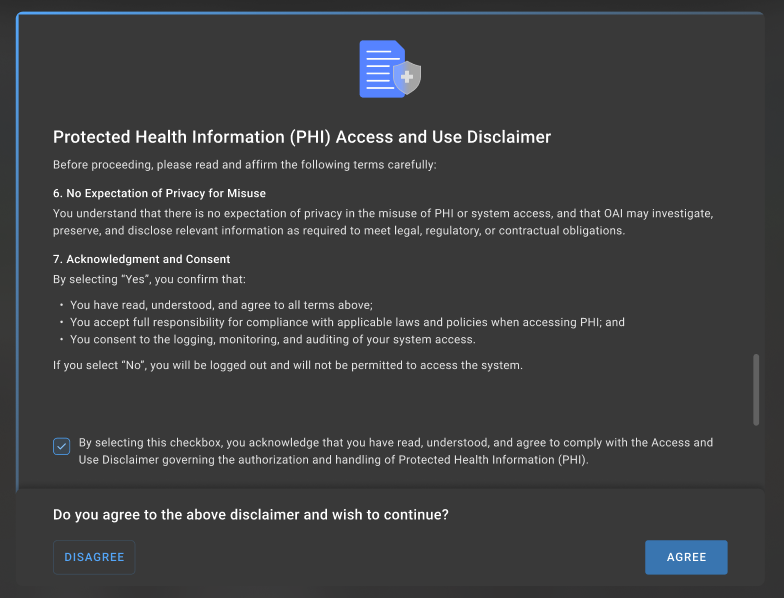
<h3 class="anchor anchorTargetStickyNavbar_Vzrq" id="phi-access-disclaimer"><a class="" href="https://help.omegaai.com/es/blog/PHI_access_consent_release_note">PHI Access Disclaimer</a><a href="https://help.omegaai.com/es/newsletter/2026-may#phi-access-disclaimer" class="hash-link" aria-label="Enlace directo al phi-access-disclaimer" title="Enlace directo al phi-access-disclaimer" translate="no">​</a></h3>
<span style="background:#5465FE;color:#fff;padding:2px 9px;border-radius:11px;font-size:0.72em;font-weight:700;margin-right:5px;white-space:nowrap;vertical-align:middle">OmegaAI</span>
<p>OmegaAI now shows a clear disclaimer when protected health information is accessed, reinforcing compliant data handling at the point of use.</p>
<p><img decoding="async" loading="lazy" alt="The PHI access disclaimer prompt" src="https://help.omegaai.com/es/assets/images/phi-disclaimer-f8e512d3118803b223746ee654810c28.png#bordered" width="784" height="598" class="img_ev3q"></p>
<h3 class="anchor anchorTargetStickyNavbar_Vzrq" id="study-downloads--cddisc-burning"><a class="" href="https://help.omegaai.com/es/blog/studydownloads_Cd_disc_burner_releasenote">Study Downloads &amp; CD/Disc Burning</a><a href="https://help.omegaai.com/es/newsletter/2026-may#study-downloads--cddisc-burning" class="hash-link" aria-label="Enlace directo al study-downloads--cddisc-burning" title="Enlace directo al study-downloads--cddisc-burning" translate="no">​</a></h3>
<span style="background:#5465FE;color:#fff;padding:2px 9px;border-radius:11px;font-size:0.72em;font-weight:700;margin-right:5px;white-space:nowrap;vertical-align:middle">OmegaAI</span>
<p>New options make it easier to download studies and burn them to CD or disc directly from OmegaAI.</p>
<hr>
<h2 class="anchor anchorTargetStickyNavbar_Vzrq" id="fixes--resolved-issues">Fixes &amp; Resolved Issues<a href="https://help.omegaai.com/es/newsletter/2026-may#fixes--resolved-issues" class="hash-link" aria-label="Enlace directo al Fixes &amp; Resolved Issues" title="Enlace directo al Fixes &amp; Resolved Issues" translate="no">​</a></h2>
<table><thead><tr><th>Product</th><th>Summary</th></tr></thead><tbody><tr><td><span style="background:#5465FE;color:#fff;padding:2px 9px;border-radius:11px;font-size:0.72em;font-weight:700;margin-right:5px;white-space:nowrap;vertical-align:middle">OmegaAI</span></td><td><strong>Worklist column order</strong> now stays consistent. Resolved.</td></tr><tr><td><span style="background:#5465FE;color:#fff;padding:2px 9px;border-radius:11px;font-size:0.72em;font-weight:700;margin-right:5px;white-space:nowrap;vertical-align:middle">OmegaAI</span></td><td><strong>Duplicate worklist rows</strong> after order updates no longer appear. Resolved.</td></tr><tr><td><span style="background:#5465FE;color:#fff;padding:2px 9px;border-radius:11px;font-size:0.72em;font-weight:700;margin-right:5px;white-space:nowrap;vertical-align:middle">OmegaAI</span></td><td><strong>Date-of-birth filter</strong> now returns correct results when typed manually. Resolved.</td></tr><tr><td><span style="background:#5465FE;color:#fff;padding:2px 9px;border-radius:11px;font-size:0.72em;font-weight:700;margin-right:5px;white-space:nowrap;vertical-align:middle">OmegaAI</span></td><td><strong>"Clear All"</strong> now removes column-header filters. Resolved.</td></tr><tr><td><span style="background:#063e53;color:#fff;padding:2px 9px;border-radius:11px;font-size:0.72em;font-weight:700;margin-right:5px;white-space:nowrap;vertical-align:middle">PowerServer</span></td><td><strong>Scheduled patients</strong> now appear on the Scheduler for past and future dates. Resolved.</td></tr><tr><td><span style="background:#063e53;color:#fff;padding:2px 9px;border-radius:11px;font-size:0.72em;font-weight:700;margin-right:5px;white-space:nowrap;vertical-align:middle">PowerServer</span></td><td><strong>Patient search</strong> now handles names containing an apostrophe. Resolved.</td></tr><tr><td><span style="background:#063e53;color:#fff;padding:2px 9px;border-radius:11px;font-size:0.72em;font-weight:700;margin-right:5px;white-space:nowrap;vertical-align:middle">PowerServer</span></td><td><strong>Reschedule emails</strong> are no longer sent when an appointment moves to parking. Resolved.</td></tr><tr><td><span style="background:#063e53;color:#fff;padding:2px 9px;border-radius:11px;font-size:0.72em;font-weight:700;margin-right:5px;white-space:nowrap;vertical-align:middle">PowerServer</span></td><td><strong>Patient document preview</strong> no longer shows a previous patient's file. Resolved.</td></tr></tbody></table>
<hr>
<div class="theme-admonition theme-admonition-info admonition_xJq3 alert alert--info"><div class="admonitionHeading_Gvgb"><span class="admonitionIcon_Rf37"><svg viewBox="0 0 14 16"><path fill-rule="evenodd" d="M7 2.3c3.14 0 5.7 2.56 5.7 5.7s-2.56 5.7-5.7 5.7A5.71 5.71 0 0 1 1.3 8c0-3.14 2.56-5.7 5.7-5.7zM7 1C3.14 1 0 4.14 0 8s3.14 7 7 7 7-3.14 7-7-3.14-7-7-7zm1 3H6v5h2V4zm0 6H6v2h2v-2z"></path></svg></span>Coming Next Month</div><div class="admonitionContent_BuS1"><ul>
<li class=""><strong>Image Viewer Enhancements</strong> (OmegaAI, Blume): Blume mobile Image Viewer, M-Mode ultrasound measurements, a redesigned Cine tool, and a CAD toggle for mammography.</li>
<li class=""><strong>Worklist Productivity Upgrades</strong> (OmegaAI): one-click role assignments, filtering from grouped columns, and more views on the new grid.</li>
<li class=""><strong>Hanging Protocols Enhancements</strong> (OmegaAI): a redesigned configuration screen and quick-access strip.</li>
</ul></div></div>
<hr>
<p><em>Questions about any of these updates? Browse the <a class="" href="https://help.omegaai.com/es/">Help Manual</a> or <a href="https://www.ramsoft.com/contact-us" target="_blank" rel="noopener noreferrer" class="">contact RamSoft Support</a>.</em></p>]]></content>
    </entry>
    <entry>
        <title type="html"><![CDATA[April 2026]]></title>
        <id>https://help.omegaai.com/es/newsletter/2026-april</id>
        <link href="https://help.omegaai.com/es/newsletter/2026-april"/>
        <updated>2026-04-30T00:00:00.000Z</updated>
        <summary type="html"><![CDATA[Streamlined OmegaAI navigation, plus Blume updates including mobile-number account linking, in-app Quick Guides, and customizable workflow-automation email templates.]]></summary>
        <content type="html"><![CDATA[<p>This issue covers what shipped in April 2026 across OmegaAI, Blume, and PowerServer: new features, resolved issues, and a preview of what's coming next.</p>
<div class="theme-admonition theme-admonition-tip admonition_xJq3 alert alert--success"><div class="admonitionHeading_Gvgb"><span class="admonitionIcon_Rf37"><svg viewBox="0 0 12 16"><path fill-rule="evenodd" d="M6.5 0C3.48 0 1 2.19 1 5c0 .92.55 2.25 1 3 1.34 2.25 1.78 2.78 2 4v1h5v-1c.22-1.22.66-1.75 2-4 .45-.75 1-2.08 1-3 0-2.81-2.48-5-5.5-5zm3.64 7.48c-.25.44-.47.8-.67 1.11-.86 1.41-1.25 2.06-1.45 3.23-.02.05-.02.11-.02.17H5c0-.06 0-.13-.02-.17-.2-1.17-.59-1.83-1.45-3.23-.2-.31-.42-.67-.67-1.11C2.44 6.78 2 5.65 2 5c0-2.2 2.02-4 4.5-4 1.22 0 2.36.42 3.22 1.19C10.55 2.94 11 3.94 11 5c0 .66-.44 1.78-.86 2.48zM4 14h5c-.23 1.14-1.3 2-2.5 2s-2.27-.86-2.5-2z"></path></svg></span>At a glance</div><div class="admonitionContent_BuS1"><p><strong>4</strong> new features and enhancements, <strong>8</strong> resolved issues, <strong>3</strong> coming next month.</p></div></div>
<hr>
<h2 class="anchor anchorTargetStickyNavbar_Vzrq" id="this-months-product-updates">This Month's Product Updates<a href="https://help.omegaai.com/es/newsletter/2026-april#this-months-product-updates" class="hash-link" aria-label="Enlace directo al This Month's Product Updates" title="Enlace directo al This Month's Product Updates" translate="no">​</a></h2>
<h3 class="anchor anchorTargetStickyNavbar_Vzrq" id="streamlined-navigation"><a class="" href="https://help.omegaai.com/es/blog/apps_removal_releasenote">Streamlined Navigation</a><a href="https://help.omegaai.com/es/newsletter/2026-april#streamlined-navigation" class="hash-link" aria-label="Enlace directo al streamlined-navigation" title="Enlace directo al streamlined-navigation" translate="no">​</a></h3>
<span style="background:#5465FE;color:#fff;padding:2px 9px;border-radius:11px;font-size:0.72em;font-weight:700;margin-right:5px;white-space:nowrap;vertical-align:middle">OmegaAI</span>
<p>The separate app switcher is gone. Root analytics and Blume forms are built into the main navigation, so you reach them in one click.</p>
<h3 class="anchor anchorTargetStickyNavbar_Vzrq" id="connect-account-by-mobile-number"><a class="" href="https://help.omegaai.com/es/blog/connectaccountreleasenote">Connect Account by Mobile Number</a><a href="https://help.omegaai.com/es/newsletter/2026-april#connect-account-by-mobile-number" class="hash-link" aria-label="Enlace directo al connect-account-by-mobile-number" title="Enlace directo al connect-account-by-mobile-number" translate="no">​</a></h3>
<span style="background:#8BD96E;color:#1B264C;padding:2px 9px;border-radius:11px;font-size:0.72em;font-weight:700;margin-right:5px;white-space:nowrap;vertical-align:middle">Blume</span>
<p>Users can now link their Blume account with a mobile number and OTP verification (US and Canada), in addition to email. Contact details sync automatically once connected.</p>
<h3 class="anchor anchorTargetStickyNavbar_Vzrq" id="quick-guides-in-blume"><a class="" href="https://help.omegaai.com/es/blog/Blume_quick_quides_release%20notes">Quick Guides in Blume</a><a href="https://help.omegaai.com/es/newsletter/2026-april#quick-guides-in-blume" class="hash-link" aria-label="Enlace directo al quick-guides-in-blume" title="Enlace directo al quick-guides-in-blume" translate="no">​</a></h3>
<span style="background:#8BD96E;color:#1B264C;padding:2px 9px;border-radius:11px;font-size:0.72em;font-weight:700;margin-right:5px;white-space:nowrap;vertical-align:middle">Blume</span>
<p>Blume now includes in-app Quick Guides for scheduling, viewing and downloading images, and sharing reports, on both mobile and web, without leaving the current screen.</p>
<h3 class="anchor anchorTargetStickyNavbar_Vzrq" id="workflow-automation-email-templates"><a class="" href="https://help.omegaai.com/es/blog/blume_email_templates_releasenote">Workflow Automation Email Templates</a><a href="https://help.omegaai.com/es/newsletter/2026-april#workflow-automation-email-templates" class="hash-link" aria-label="Enlace directo al workflow-automation-email-templates" title="Enlace directo al workflow-automation-email-templates" translate="no">​</a></h3>
<span style="background:#8BD96E;color:#1B264C;padding:2px 9px;border-radius:11px;font-size:0.72em;font-weight:700;margin-right:5px;white-space:nowrap;vertical-align:middle">Blume</span>
<p>A redesigned, grid-based view to create, edit, and reuse email templates for confirmations, cancellations, and invitations, with full branding and reply-to control.</p>
<hr>
<h2 class="anchor anchorTargetStickyNavbar_Vzrq" id="fixes--resolved-issues">Fixes &amp; Resolved Issues<a href="https://help.omegaai.com/es/newsletter/2026-april#fixes--resolved-issues" class="hash-link" aria-label="Enlace directo al Fixes &amp; Resolved Issues" title="Enlace directo al Fixes &amp; Resolved Issues" translate="no">​</a></h2>
<table><thead><tr><th>Product</th><th>Summary</th></tr></thead><tbody><tr><td><span style="background:#5465FE;color:#fff;padding:2px 9px;border-radius:11px;font-size:0.72em;font-weight:700;margin-right:5px;white-space:nowrap;vertical-align:middle">OmegaAI</span></td><td><strong>Worklist date-range filter</strong> now displays correctly when selected. Resolved.</td></tr><tr><td><span style="background:#5465FE;color:#fff;padding:2px 9px;border-radius:11px;font-size:0.72em;font-weight:700;margin-right:5px;white-space:nowrap;vertical-align:middle">OmegaAI</span></td><td><strong>Study status changes</strong> no longer affect other studies in the Worklist. Resolved.</td></tr><tr><td><span style="background:#5465FE;color:#fff;padding:2px 9px;border-radius:11px;font-size:0.72em;font-weight:700;margin-right:5px;white-space:nowrap;vertical-align:middle">OmegaAI</span></td><td><strong>Chat "Mark as Unread"</strong> now works. Resolved.</td></tr><tr><td><span style="background:#063e53;color:#fff;padding:2px 9px;border-radius:11px;font-size:0.72em;font-weight:700;margin-right:5px;white-space:nowrap;vertical-align:middle">PowerServer</span></td><td><strong>Expired coverages</strong> now show on the Patient Info screen. Resolved.</td></tr><tr><td><span style="background:#063e53;color:#fff;padding:2px 9px;border-radius:11px;font-size:0.72em;font-weight:700;margin-right:5px;white-space:nowrap;vertical-align:middle">PowerServer</span></td><td><strong>Order creation</strong> no longer fails with an "Edit order details failed" error. Resolved.</td></tr><tr><td><span style="background:#063e53;color:#fff;padding:2px 9px;border-radius:11px;font-size:0.72em;font-weight:700;margin-right:5px;white-space:nowrap;vertical-align:middle">PowerServer</span></td><td><strong>Utilization Review</strong> expand and collapse now works. Resolved.</td></tr><tr><td><span style="background:#063e53;color:#fff;padding:2px 9px;border-radius:11px;font-size:0.72em;font-weight:700;margin-right:5px;white-space:nowrap;vertical-align:middle">PowerServer</span></td><td><strong>Performing Physician search</strong> now includes practitioners from newly added child organizations. Resolved.</td></tr><tr><td><span style="background:#063e53;color:#fff;padding:2px 9px;border-radius:11px;font-size:0.72em;font-weight:700;margin-right:5px;white-space:nowrap;vertical-align:middle">PowerServer</span></td><td><strong>Appointment card</strong> no longer shows out-of-date order notes. Resolved.</td></tr></tbody></table>
<hr>
<div class="theme-admonition theme-admonition-info admonition_xJq3 alert alert--info"><div class="admonitionHeading_Gvgb"><span class="admonitionIcon_Rf37"><svg viewBox="0 0 14 16"><path fill-rule="evenodd" d="M7 2.3c3.14 0 5.7 2.56 5.7 5.7s-2.56 5.7-5.7 5.7A5.71 5.71 0 0 1 1.3 8c0-3.14 2.56-5.7 5.7-5.7zM7 1C3.14 1 0 4.14 0 8s3.14 7 7 7 7-3.14 7-7-3.14-7-7-7zm1 3H6v5h2V4zm0 6H6v2h2v-2z"></path></svg></span>Coming Next Month</div><div class="admonitionContent_BuS1"><ul>
<li class=""><strong>PHI Access Disclaimer</strong> (OmegaAI): a clear prompt when protected health information is accessed.</li>
<li class=""><strong>Image Viewer Hotkey Customizations</strong> (OmegaAI): map viewer tools to the keys you prefer.</li>
<li class=""><strong>Biometric Login</strong> (Blume): faster, secure sign-in on the Blume mobile app.</li>
</ul></div></div>
<hr>
<p><em>Questions about any of these updates? Browse the <a class="" href="https://help.omegaai.com/es/">Help Manual</a> or <a href="https://www.ramsoft.com/contact-us" target="_blank" rel="noopener noreferrer" class="">contact RamSoft Support</a>.</em></p>]]></content>
    </entry>
    <entry>
        <title type="html"><![CDATA[March 2026]]></title>
        <id>https://help.omegaai.com/es/newsletter/2026-march</id>
        <link href="https://help.omegaai.com/es/newsletter/2026-march"/>
        <updated>2026-03-31T00:00:00.000Z</updated>
        <summary type="html"><![CDATA[OmegaAI gains image-viewer upgrades, a redesigned Visit/Order/Study page, and study locking. PowerServer 6.7 arrives with auto key-object insertion and sub-critical finding classification.]]></summary>
        <content type="html"><![CDATA[<p>This issue covers what shipped in March 2026 across OmegaAI and PowerServer: new features, resolved issues, and a preview of what's coming next.</p>
<div class="theme-admonition theme-admonition-tip admonition_xJq3 alert alert--success"><div class="admonitionHeading_Gvgb"><span class="admonitionIcon_Rf37"><svg viewBox="0 0 12 16"><path fill-rule="evenodd" d="M6.5 0C3.48 0 1 2.19 1 5c0 .92.55 2.25 1 3 1.34 2.25 1.78 2.78 2 4v1h5v-1c.22-1.22.66-1.75 2-4 .45-.75 1-2.08 1-3 0-2.81-2.48-5-5.5-5zm3.64 7.48c-.25.44-.47.8-.67 1.11-.86 1.41-1.25 2.06-1.45 3.23-.02.05-.02.11-.02.17H5c0-.06 0-.13-.02-.17-.2-1.17-.59-1.83-1.45-3.23-.2-.31-.42-.67-.67-1.11C2.44 6.78 2 5.65 2 5c0-2.2 2.02-4 4.5-4 1.22 0 2.36.42 3.22 1.19C10.55 2.94 11 3.94 11 5c0 .66-.44 1.78-.86 2.48zM4 14h5c-.23 1.14-1.3 2-2.5 2s-2.27-.86-2.5-2z"></path></svg></span>At a glance</div><div class="admonitionContent_BuS1"><p><strong>7</strong> new features and enhancements, <strong>4</strong> resolved issues, <strong>3</strong> coming next month.</p></div></div>
<hr>
<h2 class="anchor anchorTargetStickyNavbar_Vzrq" id="this-months-product-updates">This Month's Product Updates<a href="https://help.omegaai.com/es/newsletter/2026-march#this-months-product-updates" class="hash-link" aria-label="Enlace directo al This Month's Product Updates" title="Enlace directo al This Month's Product Updates" translate="no">​</a></h2>
<h3 class="anchor anchorTargetStickyNavbar_Vzrq" id="image-viewer-enhancements"><a class="" href="https://help.omegaai.com/es/blog/viewer-enhancements-march-2026">Image Viewer Enhancements</a><a href="https://help.omegaai.com/es/newsletter/2026-march#image-viewer-enhancements" class="hash-link" aria-label="Enlace directo al image-viewer-enhancements" title="Enlace directo al image-viewer-enhancements" translate="no">​</a></h3>
<span style="background:#5465FE;color:#fff;padding:2px 9px;border-radius:11px;font-size:0.72em;font-weight:700;margin-right:5px;white-space:nowrap;vertical-align:middle">OmegaAI</span>
<p>Place a probe on a region of FDG uptake and OmegaAI now auto-segments it and computes SUV values on PET-CT, with no manual ROI drawing. A new hover option switches between Adjustment and Markup tools, and new shortcuts cycle through Hanging Protocols.</p>
<h3 class="anchor anchorTargetStickyNavbar_Vzrq" id="visit--order--study-page-redesign"><a class="" href="https://help.omegaai.com/es/docs/Getting-Started/Visit_Order_Study">Visit / Order / Study Page Redesign</a><a href="https://help.omegaai.com/es/newsletter/2026-march#visit--order--study-page-redesign" class="hash-link" aria-label="Enlace directo al visit--order--study-page-redesign" title="Enlace directo al visit--order--study-page-redesign" translate="no">​</a></h3>
<span style="background:#5465FE;color:#fff;padding:2px 9px;border-radius:11px;font-size:0.72em;font-weight:700;margin-right:5px;white-space:nowrap;vertical-align:middle">OmegaAI</span>
<p>Key patient indicators now sit in a persistent header and study details collapse into a single section, so you can review and update a visit with less scrolling.</p>
<h3 class="anchor anchorTargetStickyNavbar_Vzrq" id="study-locking"><a class="" href="https://help.omegaai.com/es/blog/Studylockingreleasenote">Study Locking</a><a href="https://help.omegaai.com/es/newsletter/2026-march#study-locking" class="hash-link" aria-label="Enlace directo al study-locking" title="Enlace directo al study-locking" translate="no">​</a></h3>
<span style="background:#5465FE;color:#fff;padding:2px 9px;border-radius:11px;font-size:0.72em;font-weight:700;margin-right:5px;white-space:nowrap;vertical-align:middle">OmegaAI</span>
<p>Finalized studies can lock automatically at a configurable status, making them read-only across the Worklist and Study pages, with controlled overrides for authorized users.</p>
<h3 class="anchor anchorTargetStickyNavbar_Vzrq" id="auto-insertion-of-key-objects-into-reports"><a href="https://help.ramsoftpacs.com/powerserverrispacs/Whats-New" target="_blank" rel="noopener noreferrer" class="">Auto Insertion of Key Objects into Reports</a><a href="https://help.omegaai.com/es/newsletter/2026-march#auto-insertion-of-key-objects-into-reports" class="hash-link" aria-label="Enlace directo al auto-insertion-of-key-objects-into-reports" title="Enlace directo al auto-insertion-of-key-objects-into-reports" translate="no">​</a></h3>
<span style="background:#063e53;color:#fff;padding:2px 9px;border-radius:11px;font-size:0.72em;font-weight:700;margin-right:5px;white-space:nowrap;vertical-align:middle">PowerServer</span>
<p>Key images drop into the designated report bookmark automatically, with an option to render patient and technique annotations onto the embedded image.</p>
<h3 class="anchor anchorTargetStickyNavbar_Vzrq" id="sub-critical-finding-classification"><a href="https://help.ramsoftpacs.com/powerserverrispacs/Whats-New" target="_blank" rel="noopener noreferrer" class="">Sub-Critical Finding Classification</a><a href="https://help.omegaai.com/es/newsletter/2026-march#sub-critical-finding-classification" class="hash-link" aria-label="Enlace directo al sub-critical-finding-classification" title="Enlace directo al sub-critical-finding-classification" translate="no">​</a></h3>
<span style="background:#063e53;color:#fff;padding:2px 9px;border-radius:11px;font-size:0.72em;font-weight:700;margin-right:5px;white-space:nowrap;vertical-align:middle">PowerServer</span>
<p>Radiologists can flag findings as Sub-Critical alongside Critical, for more precise urgency triage with configurable notifications per severity level.</p>
<h3 class="anchor anchorTargetStickyNavbar_Vzrq" id="configuration-update-tracking-in-audit-log"><a href="https://help.ramsoftpacs.com/powerserverrispacs/Whats-New" target="_blank" rel="noopener noreferrer" class="">Configuration Update Tracking in Audit Log</a><a href="https://help.omegaai.com/es/newsletter/2026-march#configuration-update-tracking-in-audit-log" class="hash-link" aria-label="Enlace directo al configuration-update-tracking-in-audit-log" title="Enlace directo al configuration-update-tracking-in-audit-log" translate="no">​</a></h3>
<span style="background:#063e53;color:#fff;padding:2px 9px;border-radius:11px;font-size:0.72em;font-weight:700;margin-right:5px;white-space:nowrap;vertical-align:middle">PowerServer</span>
<p>Administrative and system configuration changes are now captured in the Audit Log, each with the responsible user, timestamp, and IP address.</p>
<h3 class="anchor anchorTargetStickyNavbar_Vzrq" id="powerserver-67-now-available"><a href="https://help.ramsoftpacs.com/powerserverrispacs/Whats-New" target="_blank" rel="noopener noreferrer" class="">PowerServer 6.7 Now Available</a><a href="https://help.omegaai.com/es/newsletter/2026-march#powerserver-67-now-available" class="hash-link" aria-label="Enlace directo al powerserver-67-now-available" title="Enlace directo al powerserver-67-now-available" translate="no">​</a></h3>
<span style="background:#063e53;color:#fff;padding:2px 9px;border-radius:11px;font-size:0.72em;font-weight:700;margin-right:5px;white-space:nowrap;vertical-align:middle">PowerServer</span>
<p>PowerServer 6.7 brings MFA, SSO, and AES-256 encryption, faster rendering with HTJ2K, Sub-Critical Findings, expanded worklist filtering, and direct Blume Share from the worklist.</p>
<hr>
<h2 class="anchor anchorTargetStickyNavbar_Vzrq" id="fixes--resolved-issues">Fixes &amp; Resolved Issues<a href="https://help.omegaai.com/es/newsletter/2026-march#fixes--resolved-issues" class="hash-link" aria-label="Enlace directo al Fixes &amp; Resolved Issues" title="Enlace directo al Fixes &amp; Resolved Issues" translate="no">​</a></h2>
<table><thead><tr><th>Product</th><th>Summary</th></tr></thead><tbody><tr><td><span style="background:#5465FE;color:#fff;padding:2px 9px;border-radius:11px;font-size:0.72em;font-weight:700;margin-right:5px;white-space:nowrap;vertical-align:middle">OmegaAI</span></td><td><strong>Reading Physician assignment</strong> restored after a configuration change had blocked it. Resolved.</td></tr><tr><td><span style="background:#5465FE;color:#fff;padding:2px 9px;border-radius:11px;font-size:0.72em;font-weight:700;margin-right:5px;white-space:nowrap;vertical-align:middle">OmegaAI</span></td><td><strong>Preliminary reports</strong> are no longer replaced by blank auto-signed reports. Resolved.</td></tr><tr><td><span style="background:#5465FE;color:#fff;padding:2px 9px;border-radius:11px;font-size:0.72em;font-weight:700;margin-right:5px;white-space:nowrap;vertical-align:middle">OmegaAI</span></td><td><strong>Merged patients</strong> now appear in global search. Resolved.</td></tr><tr><td><span style="background:#5465FE;color:#fff;padding:2px 9px;border-radius:11px;font-size:0.72em;font-weight:700;margin-right:5px;white-space:nowrap;vertical-align:middle">OmegaAI</span></td><td><strong>Study Status submenu</strong> now opens next to the selected item instead of the screen corner. Resolved.</td></tr></tbody></table>
<hr>
<div class="theme-admonition theme-admonition-info admonition_xJq3 alert alert--info"><div class="admonitionHeading_Gvgb"><span class="admonitionIcon_Rf37"><svg viewBox="0 0 14 16"><path fill-rule="evenodd" d="M7 2.3c3.14 0 5.7 2.56 5.7 5.7s-2.56 5.7-5.7 5.7A5.71 5.71 0 0 1 1.3 8c0-3.14 2.56-5.7 5.7-5.7zM7 1C3.14 1 0 4.14 0 8s3.14 7 7 7 7-3.14 7-7-3.14-7-7-7zm1 3H6v5h2V4zm0 6H6v2h2v-2z"></path></svg></span>Coming Next Month</div><div class="admonitionContent_BuS1"><ul>
<li class=""><strong>Streamlined Navigation</strong> (OmegaAI): Root and Blume move into the main navigation, removing the separate app switcher.</li>
<li class=""><strong>Connect Account by Mobile</strong> (Blume): link an account by mobile number with OTP verification.</li>
<li class=""><strong>In-App Quick Guides</strong> (Blume): contextual help available directly inside Blume.</li>
</ul></div></div>
<hr>
<p><em>Questions about any of these updates? Browse the <a class="" href="https://help.omegaai.com/es/">Help Manual</a> or <a href="https://www.ramsoft.com/contact-us" target="_blank" rel="noopener noreferrer" class="">contact RamSoft Support</a>.</em></p>]]></content>
    </entry>
</feed>