May 2026
This issue covers what shipped in May 2026 across OmegaAI, Blume, and PowerServer: new features, resolved issues, and a preview of what's coming next.
7 new features and enhancements, 8 resolved issues, 3 coming next month.
This Month's Product Updates
Image Viewer Hotkey Customizations
OmegaAICustomize Image Viewer and Document Viewer hotkeys to match how you work. Map the tools you use most to the keys you prefer and move through studies faster.
Mobile Worklist & Image Viewer
OmegaAISign in from a mobile browser to see a streamlined Worklist and Image Viewer built for the smaller screen. Rolling out gradually, so availability may vary as access expands.
Release Updates Notification Center
OmegaAIA new in-app panel shows your most recent product updates in reverse-chronological order, highlights what you have not seen, and links each one to its help article.

Blume & OmegaAI Appointment Status Sync
Blume OmegaAIAppointment statuses now stay in sync between Blume and OmegaAI across the full lifecycle (Scheduled, Confirmed, Requested, Cancelled, Completed, No Show), with plain-language descriptions for patients. OmegaAI remains the single source of truth.
Biometric Login on the Blume Mobile App
BlumeUsers can unlock the Blume mobile app with fingerprint, face recognition, PIN, or pattern, with an automatic session timeout after 15 minutes of inactivity.
PHI Access Disclaimer
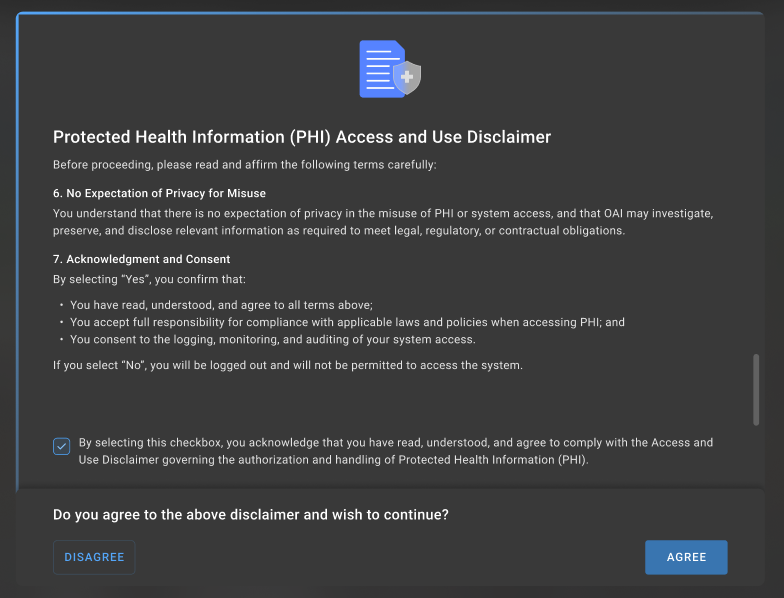
OmegaAIOmegaAI now shows a clear disclaimer when protected health information is accessed, reinforcing compliant data handling at the point of use.
Study Downloads & CD/Disc Burning
OmegaAINew options make it easier to download studies and burn them to CD or disc directly from OmegaAI.
Fixes & Resolved Issues
| Product | Summary |
|---|---|
| OmegaAI | Worklist column order now stays consistent. Resolved. |
| OmegaAI | Duplicate worklist rows after order updates no longer appear. Resolved. |
| OmegaAI | Date-of-birth filter now returns correct results when typed manually. Resolved. |
| OmegaAI | "Clear All" now removes column-header filters. Resolved. |
| PowerServer | Scheduled patients now appear on the Scheduler for past and future dates. Resolved. |
| PowerServer | Patient search now handles names containing an apostrophe. Resolved. |
| PowerServer | Reschedule emails are no longer sent when an appointment moves to parking. Resolved. |
| PowerServer | Patient document preview no longer shows a previous patient's file. Resolved. |
- Image Viewer Enhancements (OmegaAI, Blume): Blume mobile Image Viewer, M-Mode ultrasound measurements, a redesigned Cine tool, and a CAD toggle for mammography.
- Worklist Productivity Upgrades (OmegaAI): one-click role assignments, filtering from grouped columns, and more views on the new grid.
- Hanging Protocols Enhancements (OmegaAI): a redesigned configuration screen and quick-access strip.
Questions about any of these updates? Browse the Help Manual or contact RamSoft Support.