Using the Parking Bay
Overview
The Parking Bay is a temporary holding area for studies that need to be scheduled or rescheduled. It provides flexibility in appointment management by letting you park a study and place it at the right time when ready.
It is accessed via the P icon in the bottom-right corner of the Scheduler. Hover over the icon to expand the full Parking Bay panel.
Steps to Use
1. Find the study
Identify the study you want to hold — it can be in the Worklist or the Scheduler.
Note: Only studies with a Workflow status of Ordered can be moved to the Parking Bay or Scheduler. If the study has a different status, the following message appears: "Appointment cannot be moved to parking bay for this study. Check its Workflow/Study status."
2. Drag to the Parking Bay
Hover over the P icon in the bottom-right corner to expand the panel, then drag and drop the study onto it.
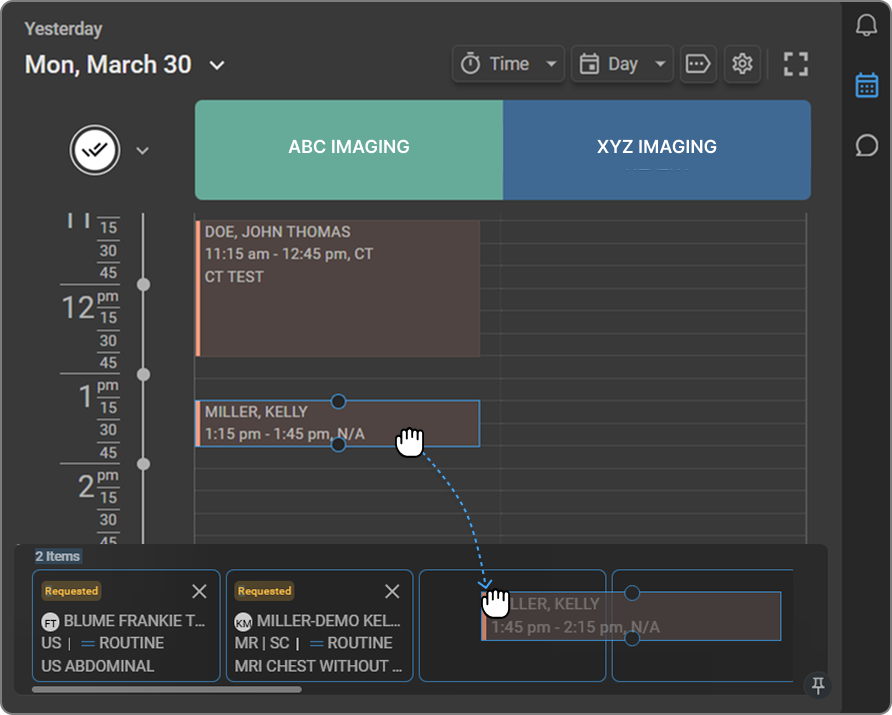
3. Study is parked
The study appears as a card showing a Requested badge, patient name, modality, priority, and study description. The count on the P icon updates automatically.

4. Reschedule from the Parking Bay
Hover over the P icon to expand the bay, then drag the card back onto the Scheduler and drop it into the desired time slot on the Healthcare Service of your choice.
Managing the Parking Bay
-
Remove a study Click the X button on the top-right corner of a study card to remove it from the Parking Bay. Only remove a study if it has been cancelled or handled elsewhere.
-
Scroll through parked studies Use the slider at the bottom of the Parking Bay to scroll horizontally and view all parked study cards when there are more than fit on screen.
-
Rearrange the cards Click and drag a study card to reorder it within the Parking Bay. Drop it in the desired position to prioritize the order in which studies are scheduled.
-
Pin the Parking Bay Click the pin icon in the bottom-right corner of the Parking Bay to keep it permanently visible while scrolling the Scheduler. Click it again to unpin.