Product: Improved Report Amendment Workflow
Overview
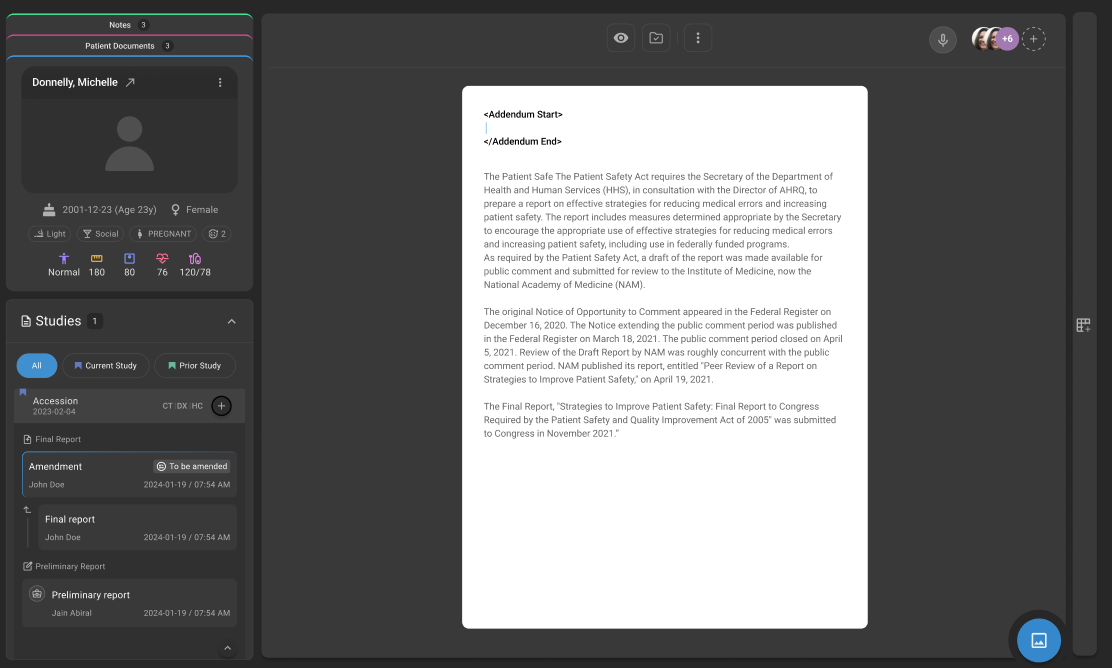
This release introduces updates to the Report Amendment Workflow in OmegaAI to improve usability, efficiency, and system reliability. This updated workflow introduces a safer, role-based workflow where all amendments are made on a copy of the signed report, with auto-inserted addendum tags and clear approval flow between users.
What’s New
1. Amendment on Report Copy with Addendum Tagging
What changed:
Amendments are now performed on a copy of the signed report instead of modifying the original. Addendum Start and End tags are automatically inserted during the amendment process.
Benefit:
Ensures audit integrity by preserving the original report while clearly identifying amended content through automatic tagging—improving clarity, standardization, and overall amendment handling.
2. Role-Based Amendment Workflow
What changed:
Amendment actions are now controlled based on user roles:
- Reading Physician can amend directly
- Non-Reading Physician can request amendments
- Report Owner can accept or reject amendment requests
Benefit:
Introduces better control and accountability, ensuring only authorized users can perform or approve amendments.
3. Structured Status Transitions
What changed:
Defined status transitions have been introduced:
- Signed → To Be Amended (when amendment starts)
- To Be Amended → Signed or Amended (after completion, based on workflow configuration)
Benefit:
Provides clear visibility into amendment stages, improving tracking and workflow transparency.
Important Notes
- Original signed reports cannot be edited directly; all amendments are performed on a copy
- Addendum tags are system-generated and cannot be manually removed
- Amendment actions are restricted based on user roles and permissions
- Final status may vary based on configured workflow (Signed or Amended)
Where to Find It
Navigation path in the application:
Image Viewer → Embedded Document Viewer (EDV) → Final Report → Amend
Amendment status transitions (Signed → To Be Amended → Signed/Amended) are reflected within the report workflow in EDV.