Product: Labels - Financial Class & Kind
Overview
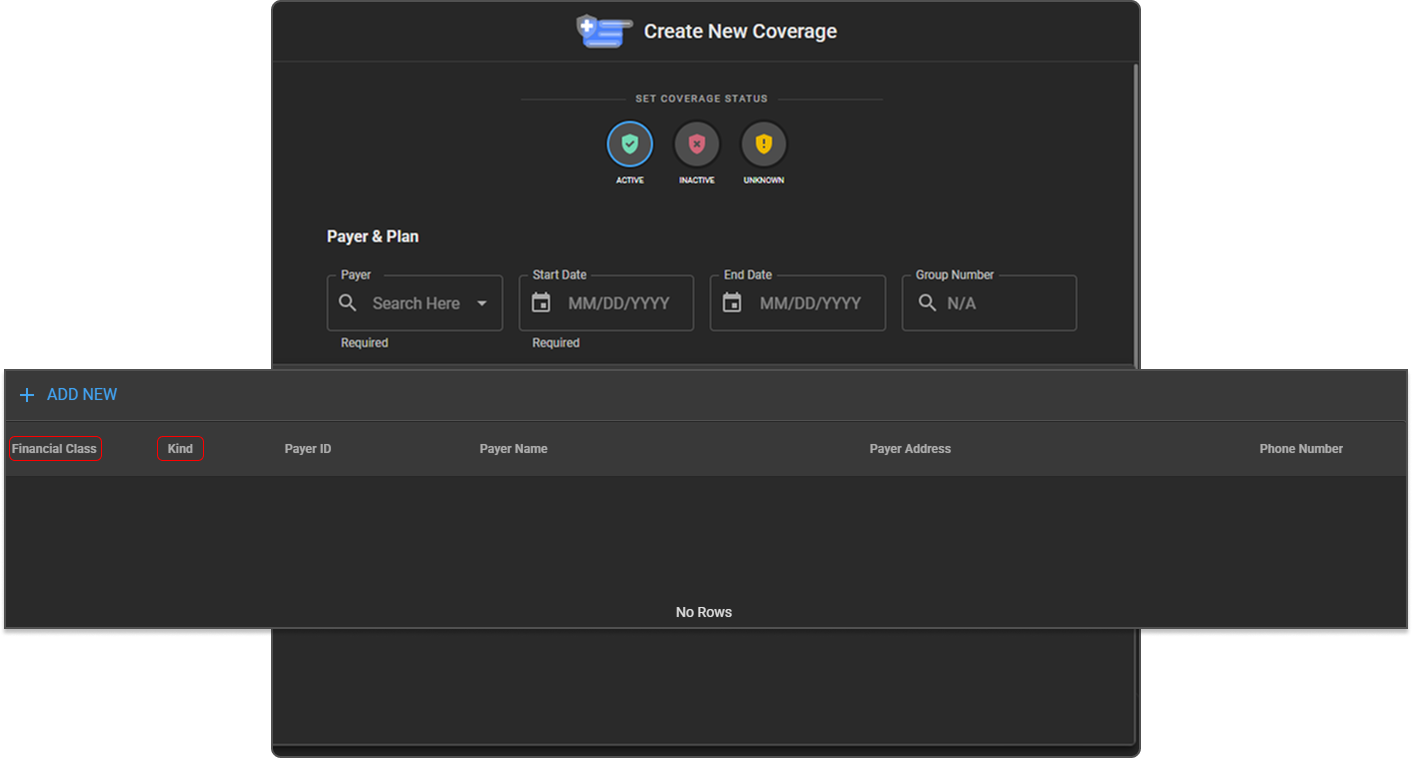
To align OmegaAI with standard billing and insurance terminology, two field labels on the Insurance Payer and Coverage screens have been renamed. This is a display-only change: field behavior, stored data, and reporting are unaffected, so no re-entry or re-training is required.
What's New
1. "Financial Type" is now called "Financial Class"
What changed:
Wherever "Financial Type" used to appear — on the Insurance Payer screen, the Financial Type list, and on Coverage details — it now reads "Financial Class."
Benefit:
Reduces the gap between the term seen on screen and the term used in billing conversations, patient statements, and payer contracts — cutting down on mix-ups during training and day-to-day work.
2. "Payer Type" is now called "Kind"
What changed:
The "Payer Type" field on the Insurance Payer screen is now labeled "Kind." It still works exactly the same way — for example, marking a payer as self-pay or insurance is unchanged.
Benefit:
Removes a source of confusion where "type" was used for two different concepts (Financial Type and Payer Type) on the same screen.
Important Notes
- Display-only change: Field IDs, stored values, and FHIR mappings are unchanged. Existing payer and coverage records, reports, and integrations continue to work without modification.
- No migration or downtime: The new labels take effect automatically the next time the affected screens are loaded.
Where to Find It
- Financial Class: Organization → RIS → Financial Class
- Kind: Organization → RIS → Payers (also shown when adding or editing a payer, and on the Coverage screen)