Product Update: Countdown to the New Worklist
Overview
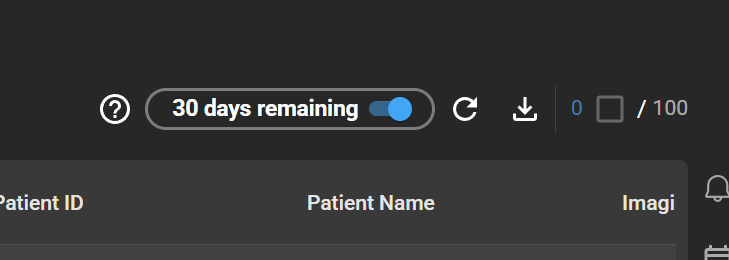
OmegaAI is sunsetting the legacy worklist and moving all users to the new worklist. To make the transition clear and predictable, the "Try New Worklist" toggle in the worklist header has been replaced with a live countdown timer showing how many days remain until cutover. On the cutover date, the toggle is removed entirely and all users are served the new worklist by default.
This update is informational — no action is required to continue using OmegaAI. We recommend switching to the new worklist now and getting comfortable before the timer reaches zero.
What's New
1. Live Countdown in the Worklist Header
What changed:
The previous "Try New Worklist" toggle has been replaced with a countdown label that updates each day.
The toggle remains fully functional throughout the countdown — you can switch between the legacy and new worklist as often as you like.
2. Automatic Cutover to the New Worklist
What changed:
When the countdown reaches zero, the toggle is removed from the worklist header and all users are automatically served the new worklist, regardless of which one they had selected previously. After cutover, the legacy worklist is no longer accessible.
Important Notes
- Toggle still works during the countdown. You can switch back to the legacy worklist at any time before the cutover date if you need to.
- No opt-out after cutover. Once the countdown reaches zero, the legacy worklist is no longer available. We recommend transitioning early and reporting any blockers before the cutover date.
- Your worklist layouts carry over. Saved worklist layouts, columns, filters, and groupings are already shared between the legacy and new worklist — no migration needed.
Where to Find It
Worklist → Header — look for the countdown label where the "Try New Worklist" toggle used to be.
Preparing for the Cutover
- Switch to the new worklist now and use it as your default day-to-day worklist
- Review your saved layouts and confirm they look correct in the new worklist
- Explore the new-worklist features — column-aware right-click assignment, grouped-column filters, multi-column sort, and the new grids in Study History and Teaching Folder
- Report any blockers or unexpected behavior to your RamSoft contact so we can address them before cutover