Product: Blume Patient Portal Status
· 2 min read
Overview
The Indicators column on the worklist now shows whether a study's patient has a Blume Patient Portal account, so you no longer need to open the patient record to check.
The Indicators column on the worklist now shows whether a study's patient has a Blume Patient Portal account, so you no longer need to open the patient record to check.
An Order's status now updates on its own as its studies progress. Sign every study on an Order and the Order moves to completed by itself — no manual step, and no finished work still sitting at active.
When every active study on an Order reaches SIGNED, the Order moves to completed. The same applies across the rest of the workflow: all studies on HOLD moves the Order to on-hold, all studies CANCELLED moves it to revoked, and the first study to reach PATIENT ARRIVED moves a draft Order to active. If work is still outstanding, the Order is left alone.
Order status is now a dependable signal of where the work actually stands, so worklists, filters and reporting reflect reality without anyone maintaining it by hand.
A CANCELLED study stays on its Order but no longer counts as outstanding work, so an Order with one signed study and one cancelled study now reaches completed. Studies at PRIOR — the status a signed study moves to — behave the same way.
Orders finish when the remaining work finishes, instead of being held open by a study nobody is waiting on.
Previously any update to a study moved an on-hold or completed Order back to active — including the very update that should have completed it. Now a study reaching SIGNED or CANCELLED leaves the Order's status alone. Moving a study back to an in-progress status still returns the Order to active, which is intended: the work really has resumed.
Orders settle instead of oscillating, and there are fewer "Another User has updated this record" conflicts while images are still landing.
Existing Orders are not updated retroactively. An Order whose studies were all signed before this release keeps its current status until one of its studies is updated again. This is expected, not a fault.
Taking an Order off hold does not move its studies back. The studies stay at HOLD and are updated individually.
Workflow step names matter. These rules are resolved by workflow step name for each organization. An organization with no SIGNED workflow step will never complete Orders — worth checking first if Orders are not completing as expected. Note the step is named PATIENT ARRIVED, even though the study status is displayed as ARRIVED.
Coverage on a finished Order is now fixed in place. Once an Order reaches completed, revoked or entered-in-error, later changes to patient-level coverage no longer flow down to it. Coverage already recorded on the Order is unchanged.
Worklist → right-click a study row → Order → Order panel → Order Status
Order Status is also available as a Worklist column.
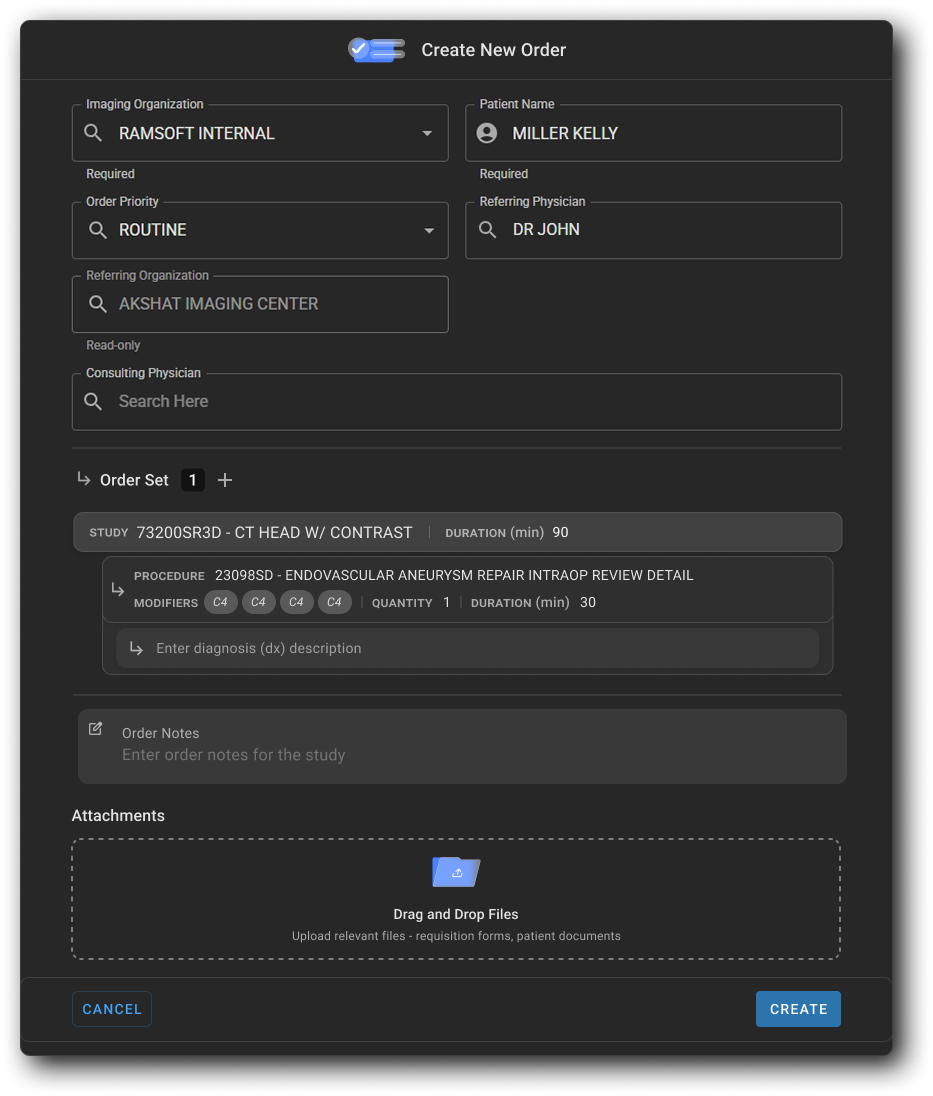
The Create New Order experience has been redesigned with a new full-page drawer that brings all order details — patient, physician, coverage, order sets, notes, and attachments — into a single, structured workflow, replacing the previous narrow side panel.
Note: This feature is currently available to Canadian users at omegaai.ca.
OmegaAI is sunsetting the legacy worklist and moving all users to the new worklist. To make the transition clear and predictable, the "Try New Worklist" toggle in the worklist header has been replaced with a live countdown timer showing how many days remain until cutover. On the cutover date, the toggle is removed entirely and all users are served the new worklist by default.
This update is informational — no action is required to continue using OmegaAI. We recommend switching to the new worklist now and getting comfortable before the timer reaches zero.
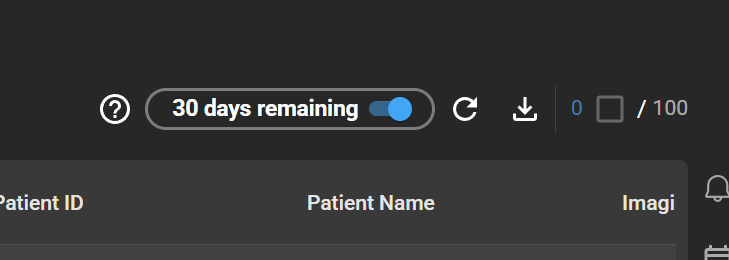
The previous "Try New Worklist" toggle has been replaced with a countdown label that updates each day.
The toggle remains fully functional throughout the countdown — you can switch between the legacy and new worklist as often as you like.
When the countdown reaches zero, the toggle is removed from the worklist header and all users are automatically served the new worklist, regardless of which one they had selected previously. After cutover, the legacy worklist is no longer accessible.
Worklist → Header — look for the countdown label where the "Try New Worklist" toggle used to be.
This release brings a set of usability improvements to the OmegaAI Worklist, focused on cutting clicks out of high-frequency tasks — assigning roles to studies, filtering grouped columns, and standardizing on the modern worklist grid. Study History and the Teaching Folder also move off the legacy grid and action wheel onto the new worklist grid component, so the worklist experience is now consistent across the application.
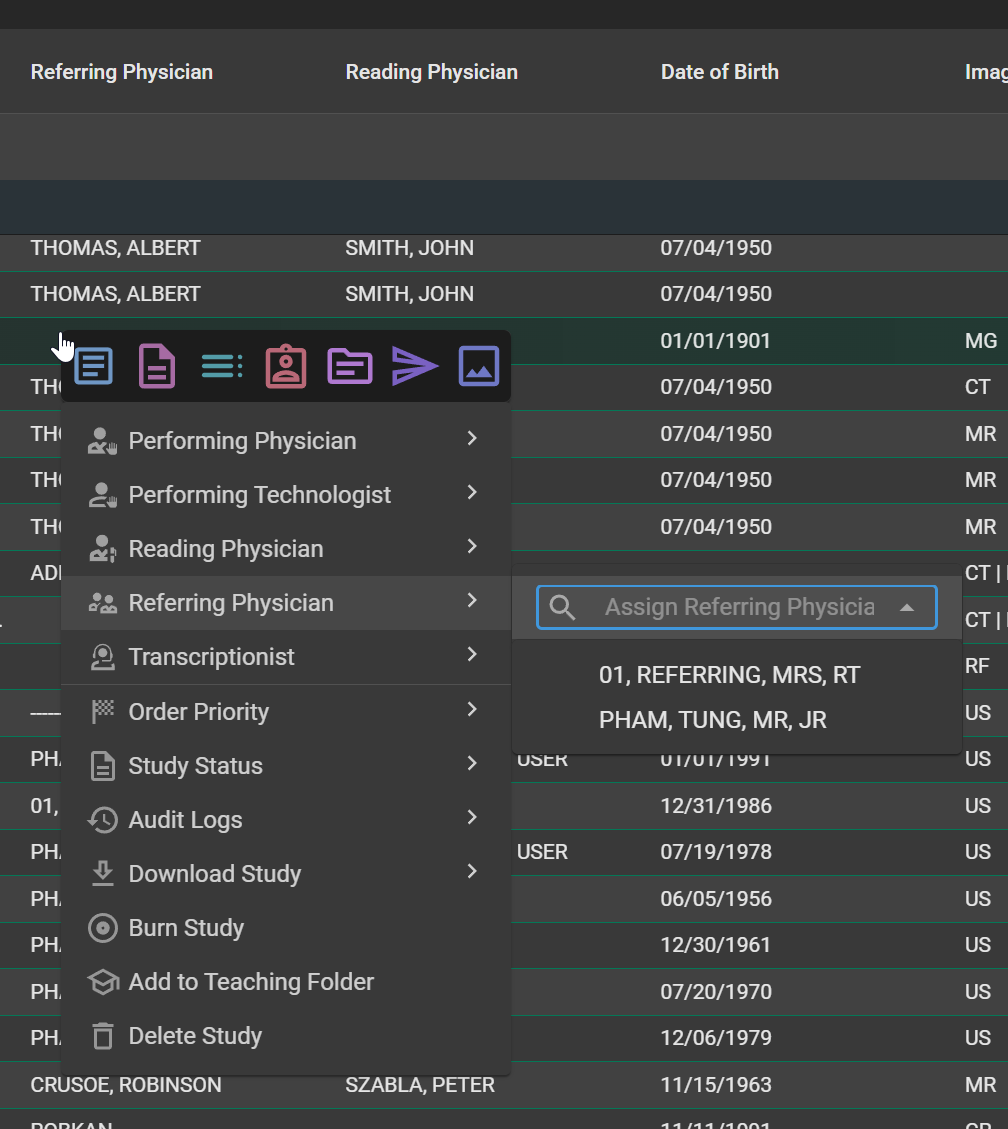
Right-clicking on a role cell in the worklist — Performing Physician, Performing Technologist, Reading Physician, Referring Physician, Transcriptionist, Status, or Priority — now opens the right-click menu with that role already selected and the search input focused. Type a name fragment, use ArrowUp / ArrowDown to navigate matches, and press Enter to assign. Esc closes the menu without assigning. When multiple studies are selected, the same flow assigns the chosen person to all of them at once. Right-clicking outside of a role column preserves the existing default menu behavior.
Radiologists and worklist coordinators can complete an assignment in a single interaction — right-click, type, Enter — instead of the previous two-step process of picking the role first and then the person. The impact compounds on high-volume worklists where assignments happen dozens of times per shift.
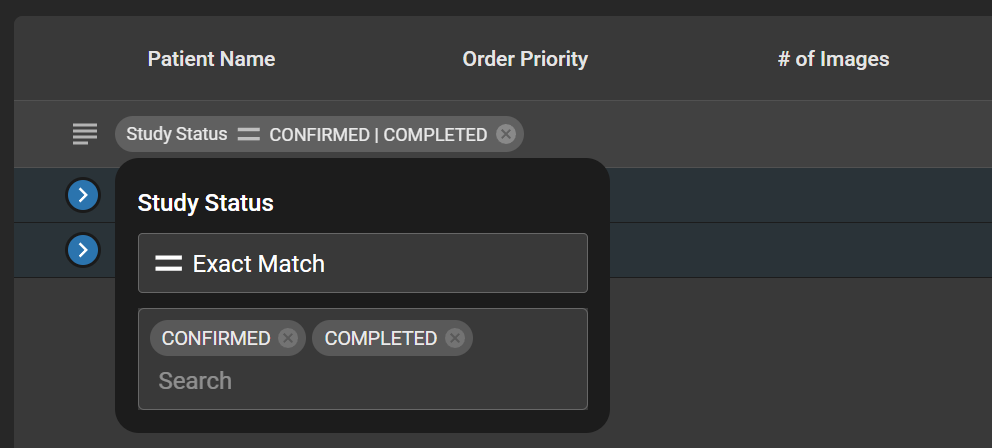
When a column is dragged into the grouping section, the column can now be filtered directly from its group bubble. Clicking the bubble exposes a filter input, and the active filter indicator stays inside the bubble — not as a separate pill at the top of the worklist. If a column is already filtered when it is grouped, the existing filter pill automatically moves into the group bubble. Filters on grouped columns can be cleared independently without removing the grouping itself.
Users no longer have to apply a filter before grouping, and there is no longer any ambiguity about which filter belongs to which group. Complex grouped views — for example, grouping by Modality and then narrowing to CT and MR — are now intuitive and self-describing.
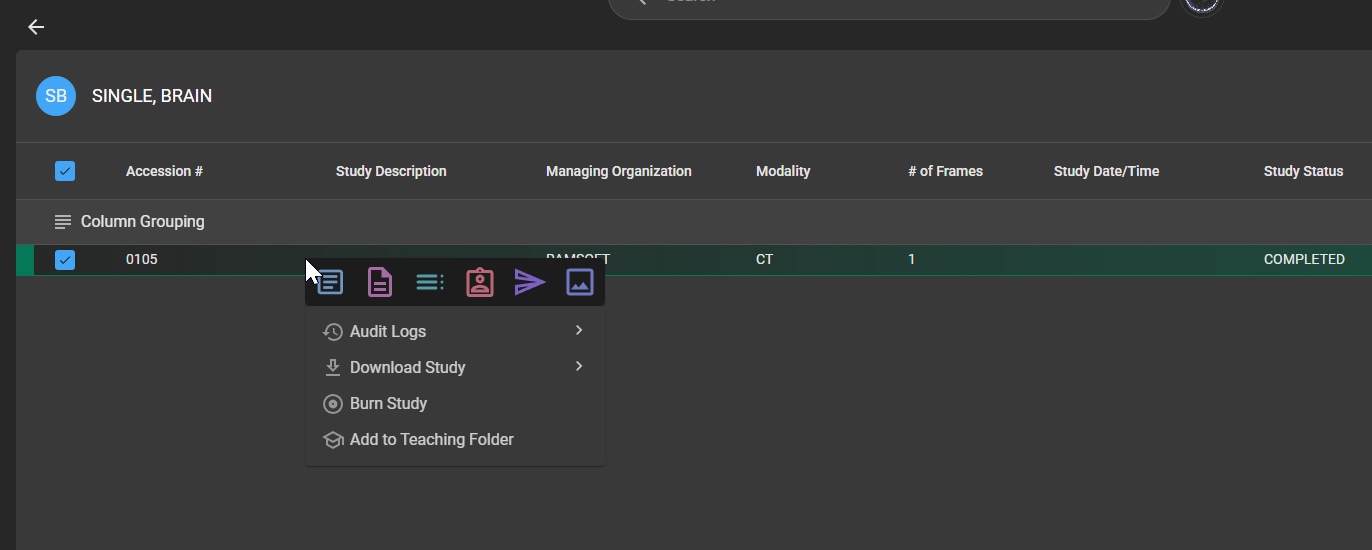
Study History and the Teaching Folder have been migrated off the legacy grid and action wheel onto the new worklist grid component. Both areas now use the standard worklist right-click context menu, including study navigation items such as Document Viewer, Image Viewer, and Study History, plus supports the advanced features such as search-as-you-type filter that already exists in the main worklist.
The look and feel of these screens is now consistent with the rest of the OmegaAI worklist, so users don't have to learn a separate interaction model for Study History or the Teaching Folder. Power-user features like multi-column sort and the advanced filter become available where they previously weren't.
This release introduces significant updates to Study Downloads and CD/Disc Burner in OmegaAI, focused on improving speed, reliability, and resilience during large study exports.
Large study exports are now dramatically faster due to connection reuse optimization. A 1.3 GB study that previously took ~30 minutes now completes in ~6 minutes.
Clinicians and staff spend less time waiting for large imaging studies to download, improving turnaround time for patient care.
Study downloads now use the browser's native download system with range request support. If a network connection drops mid-download, the browser automatically resumes from exactly where it left off.
Users no longer need to restart large downloads from scratch after a connection interruption — especially critical for large MRI and CT studies.
CD/Disc burn sessions now automatically resume if the connection is interrupted mid-burn. Additionally, authentication tokens are refreshed automatically in the background during long burn sessions, preventing silent failures.
Long burn sessions complete reliably without requiring users to restart or re-authenticate, even on slow or unstable connections.
Study Downloads: Worklist → Study → Download CD/Disc Burner: Worklist → Study → Burn to CD
OmegaAI Export Features – https://help.omegaai.com/docs/Worklist/worklist_omegaai_export