Product: Image Viewer Enhancements & Blume Mobile Image Viewer
Overview
This release introduces the Blume Mobile Image Viewer, a new M-Mode measurement tool for ultrasound, and enhancements to the OmegaAI Image Viewer.
What's New
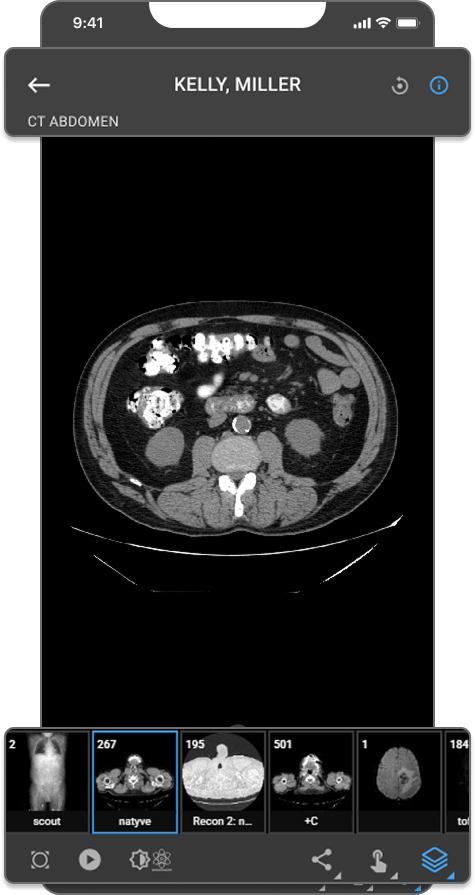
1. Blume Mobile Image Viewer
What changed:
The Blume Mobile Image Viewer is now available in the Blume Patient Portal app on iOS and Android. Patients can view DICOM studies on any touchscreen device with support for stack scroll, Cine playback, window leveling, measurements, Drag Probe, image orientation controls, landscape mode, and JPEG sharing via the native share sheet.
Benefit:
Patients can securely review their imaging studies from a mobile device with tools consistent with the desktop Image Viewer experience.
2. M-Mode Measurement Tools for Ultrasound
What changed:
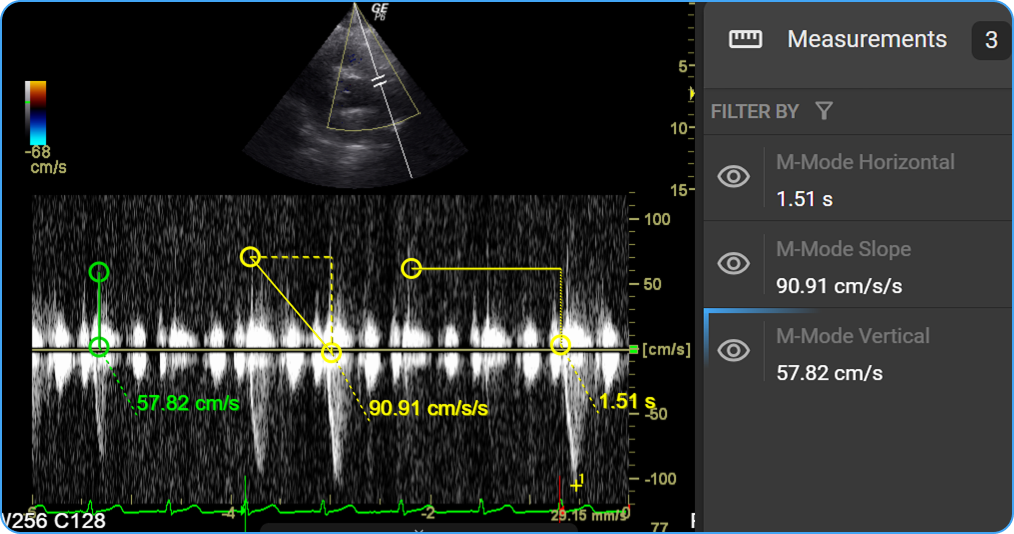
Three measurement tools are now available when an M-Mode ultrasound series is active — auto-detected on load. Slope (cm/s), Horizontal (s), and Vertical (cm/s) measurements are placed by click and drag, calibrated to DICOM metadata, and saved as annotations for structured reporting.
Benefit:
Precise in-viewer cardiac quantification on M-Mode ultrasound without switching tools or workflows.
3. New Cine Tool on Viewport
What changed:
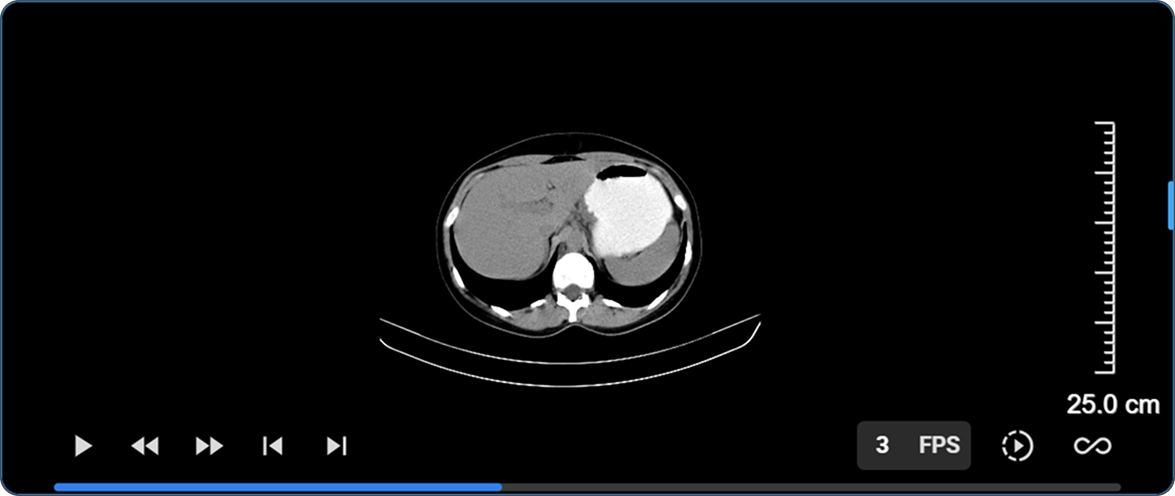
The Cine playback toolbar has been redesigned with a full-width progress bar at the bottom of the viewport. Left-side controls include play/pause, first frame, last frame, previous frame, and next frame. Right-side controls include an FPS display, playback speed, and playback method.
Benefit:
Full frame-level control over cine playback directly within the viewport.
4. Hotkey Customization
What changed:
All configurable Image Viewer key bindings are now surfaced in a dedicated Hotkey Customization panel within the User Settings page. The panel is also accessible directly from the Image Viewer via Settings → Customize Hotkeys, with a Back to IV button to return without losing context.
Benefit:
Radiologists can tailor keyboard shortcuts to match their reading preferences, with changes persisted to their profile and applied consistently across all organizations they have access to.
5. Browser-Locale Date & Time Format in Overlay Annotations
What changed:
Date and time values in Image Viewer overlay annotations — including study, series, acquisition, and content date/time, and date of birth — now automatically follow the user's browser locale (navigator.language).
Benefit:
Date and time stamps display in the format most familiar to each user with no manual configuration required.
6. Annotations Included in Export (Download, Print, Copy to Clipboard)
What changed:
Visible annotations and measurements are now included when downloading, printing, or copying an image to clipboard — the export captures the viewport exactly as displayed.
Benefit:
Toggle annotation visibility before exporting to control what is included — no extra steps required.
7. CAD Toggle for Mammography Studies
What changed:
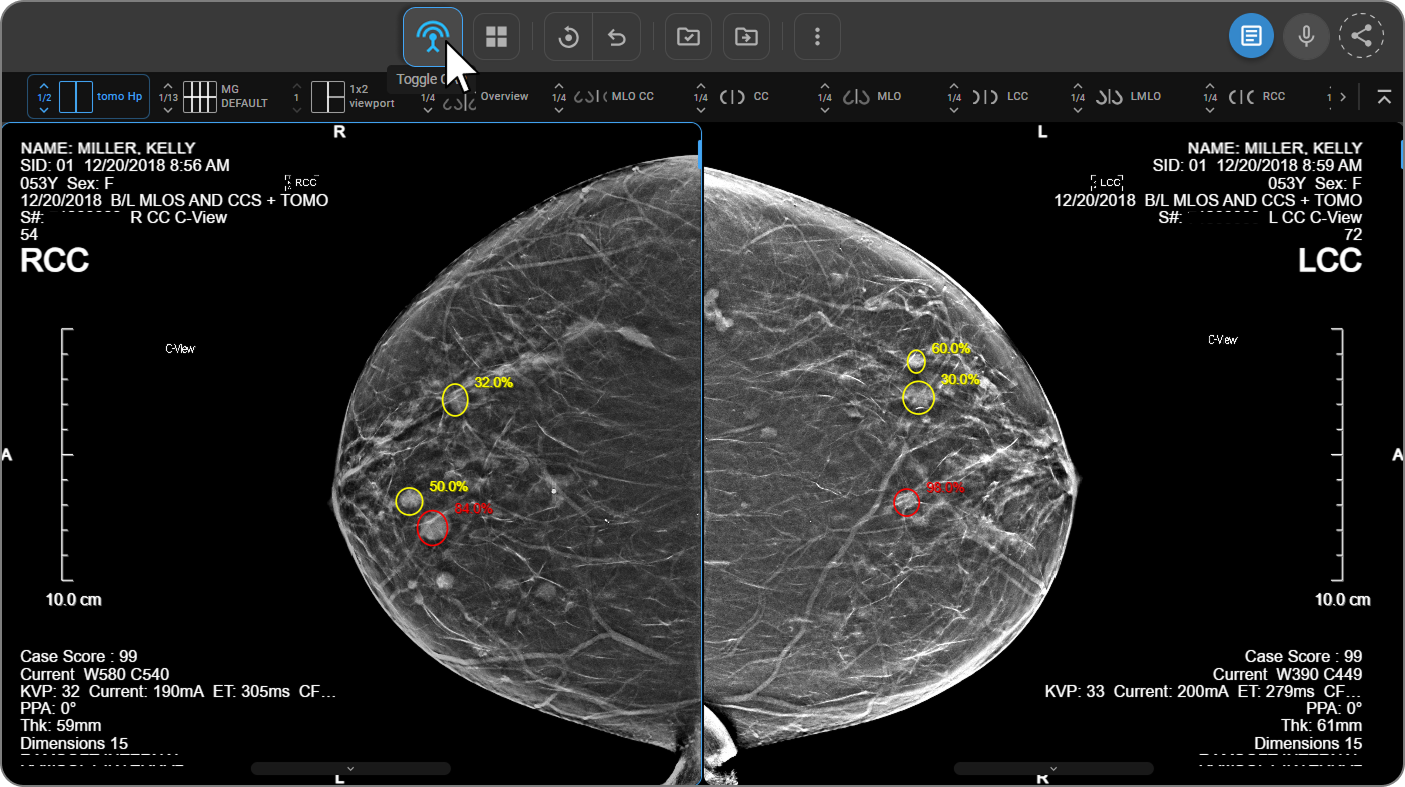
A Toggle CAD button now appears in the toolbar when a mammography study with CAD SR objects is loaded, globally showing or hiding all CAD markers across every viewport in one click. When active, the viewport overlay displays the iCAD case score and, for Tomo series, clickable slice hyperlinks that navigate directly to flagged frames.
Benefit:
Instantly compare images with and without CAD overlays and jump to flagged slices without disrupting the reading workflow.
Important Notes
- Blume Mobile Image Viewer: For non-diagnostic patient review only.
- M-Mode Tools: Only available when an M-Mode ultrasound series is active in the viewport.
- Cine Controls: Progress bar is only visible when Cine mode is active. FPS is adjusted by hovering over the FPS display and swiping left or right.
- Hotkey Customization: Mouse buttons and scroll wheel are not valid inputs. System-reserved keys cannot be reassigned. The Back button is hidden during Edit Mode.
- Time Format: Automatic — no configuration required.
- Export with Annotations: Only currently visible annotations are captured; hidden annotations are excluded.
- CAD Toggle: Only appears on mammography studies with CADSR objects. Does not affect user-drawn annotations. Default state is off unless a preference is saved.
Where to Find It
- Blume Mobile Image Viewer: Blume app → Completed → View Results → View Images
- M-Mode Tools: Image Viewer → Customize Toolbar → M-Mode → load an M-Mode ultrasound series
- Cine Controls: Image Viewer → activate Cine mode → progress bar appears at viewport bottom
- Hotkey Customization: User Profile → User Settings → keyboard icon; or Image Viewer → More options (⋮) → Customize Hotkeys
- Time Format: Automatic — no action required
- Export with Annotations: Image Viewer → toggle annotation visibility → Download / Print / Copy to Clipboard
- CAD Toggle: Image Viewer → Tools menu → CAD icon (leftmost); mammography studies with CAD objects only