Product: Revamped Info Pages
Overview
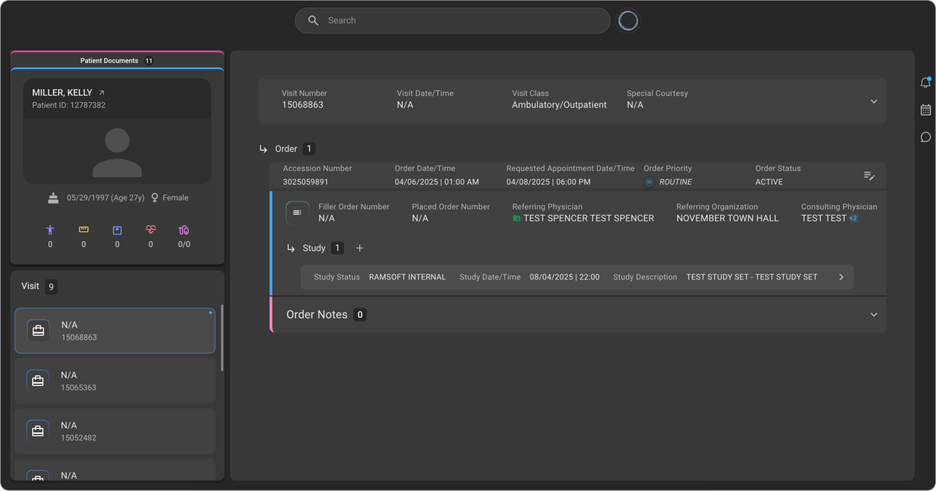
This release introduces updates to the Info Pages in OmegaAI, focused on improving usability, navigation, and structured access to patient-related information. With this enhancement, the interface has been streamlined, and accessibility to Order and Study details has been improved. A new Visit section has been introduced to organize Orders, establishing a clear hierarchy: Visit → Order → Study.
What’s New
1. Introduction of Visit Hierarchy
What changed:
A new Visit section has been introduced, restructuring the data hierarchy to: Visit → Order → Study.
Benefit:
Provides a more logical, clinically aligned organisation of patient data, improving navigation and context.
2. Visit Section with Enhanced Details
What changed:
The Visit section now includes comprehensive details, including Visit Date/Time, Patient Vitals, Accident Notes, Special Courtesy, and Visit Class (e.g., Inpatient, Outpatient).
Benefit:
Offers a centralized view of patient visit information, reducing the need to navigate across multiple sections.
3. Reassign Orders Across Patients
What changed:
Users can now reassign an Order to a different patient by searching and selecting the correct patient. All associated studies and orders can be moved from one patient to another.
Benefit:
Improves data accuracy and reduces administrative effort in correcting patient-order mismatches.
4. Improved Study Navigation
What changed:
Users can view all studies under an Order and access individual Study details by selecting study tiles.
Benefit:
Simplifies access to study-level information and improves workflow efficiency.
5. Quick Access Panel on Study Page
What changed:
A Quick Access panel has been added to the Study page, providing direct access to Image Viewer, Document Viewer, Prior Authorization, and Post Charge actions.
Benefit:
Reduces navigation steps and enables faster execution of key actions.
Important Notes
- The updated hierarchy (Visit → Order → Study) is now the standard structure across Info Pages.
- Reassigning an Order will move all associated studies to the selected patient.
- Existing workflows may require minor adaptation to align with the new navigation structure.
Where to Find It
You can access the updated Visit, Order, and Study information from the Patient Info pages within OmegaAI.
Navigation path in the application: Patient → Info → Visit → Order → Study