Product: Patient chart
Overview
This release introduces the Patient Chart feature in OmegaAI, focused on improving access to patient information and documents while enhancing workflow efficiency.
We are excited to announce the new Patient Chart feature, designed to streamline patient information and provide quick, centralized access to patient documents.
What’s New
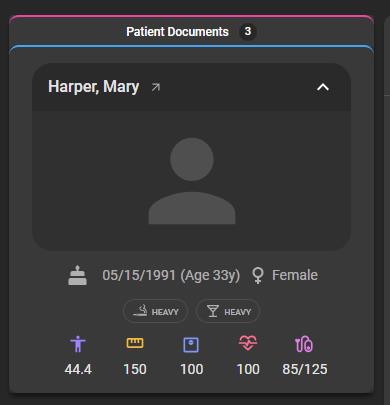
1. Patient Card
What changed:
Displays high-level patient details and vital statistics for quick reference.
Benefit:
Provides immediate access to key patient information, reducing navigation time.
2. Patient Documents Management
What changed:
Users can view all uploaded documents (from patients or technicians) and upload new documents directly. The patient’s registration form is also accessible without additional navigation.
Benefit:
Centralizes document access and simplifies document management workflows.
3. Split View for Documents
What changed:
Users can view patient documents side by side within a split view interface.
Benefit:
Enhances efficiency by enabling simultaneous document review.
Important Notes
- Patient documents include uploads from both patients and technicians.
- Registration forms are accessible directly within the Patient Chart.
- Split view is available for improved document comparison and review.
Where to Find It
You can access the Patient Chart from the Patient module in OmegaAI.
Navigation path in the application: Patient → Patient Chart