Pular para o conteúdo principal

2 postagens marcadas com "updates"

Ver todas os Marcadores

Product Update: Client-Facing UI – Apps Removal

· Leitura de 2 minutos

Overview

This release introduces a streamlined navigation experience by removing the My Apps application switcher. Previously, users accessed Root analytics and Blume forms through a separate app-selection interface. These are now directly integrated into the main navigation, reducing clicks and improving workflow efficiency.

What's New

1. Removal of the My Apps Switcher

What changed:

The My Apps menu — which previously required users to select between the Root and Blume app tiles — has been removed from the interface.

Benefit:

Eliminates an extra navigation step, giving users faster and more direct access to key areas of the application.
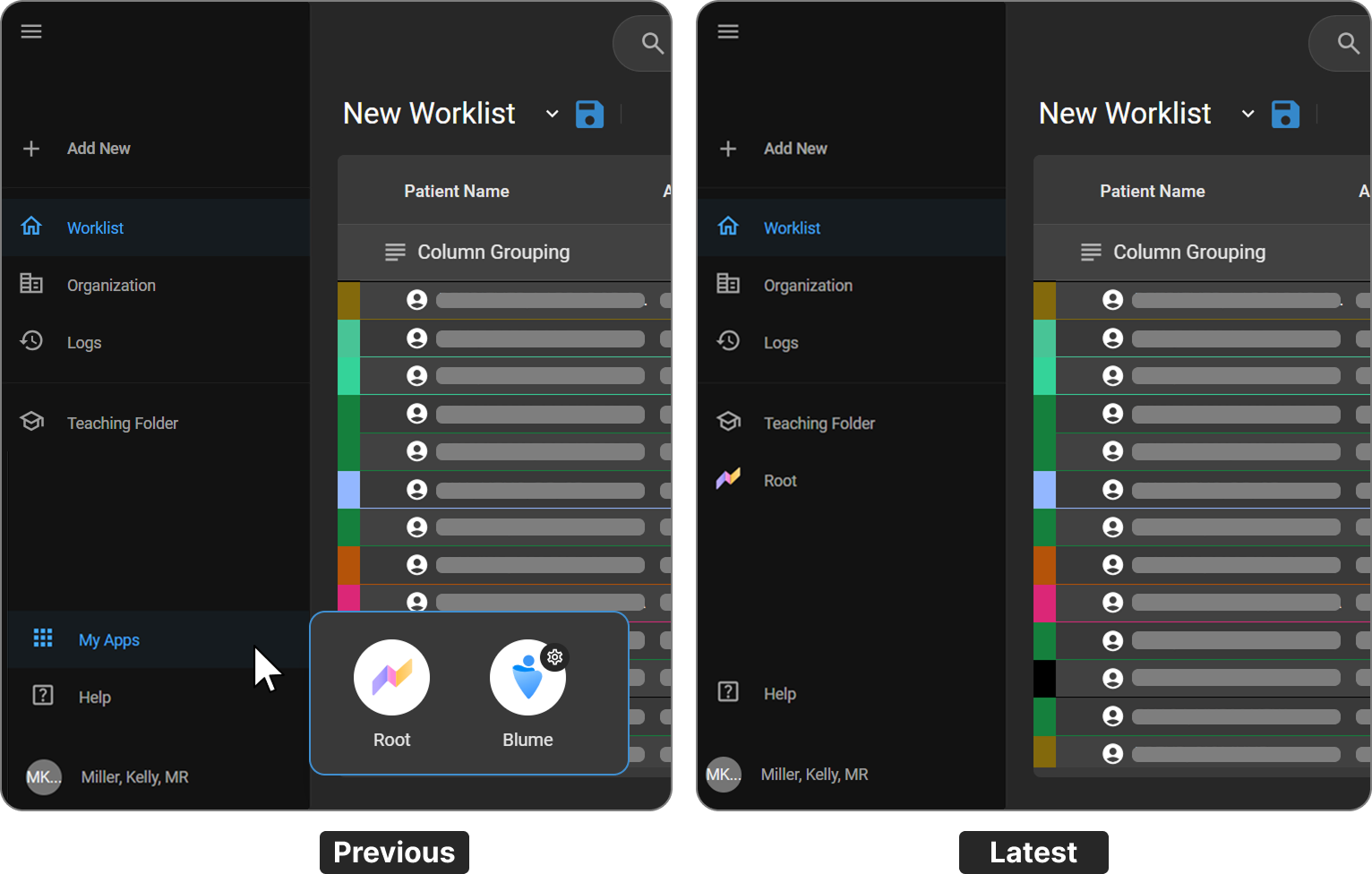
apps removal


2. Root Added as a Direct Navigation Item

What changed:

Root is now accessible as a dedicated item in the left sidebar navigation, alongside Worklist, Organization, Logs, and Teaching Folder.

Benefit:

Users can navigate directly to Root analytics without going through an intermediate app-selection screen.
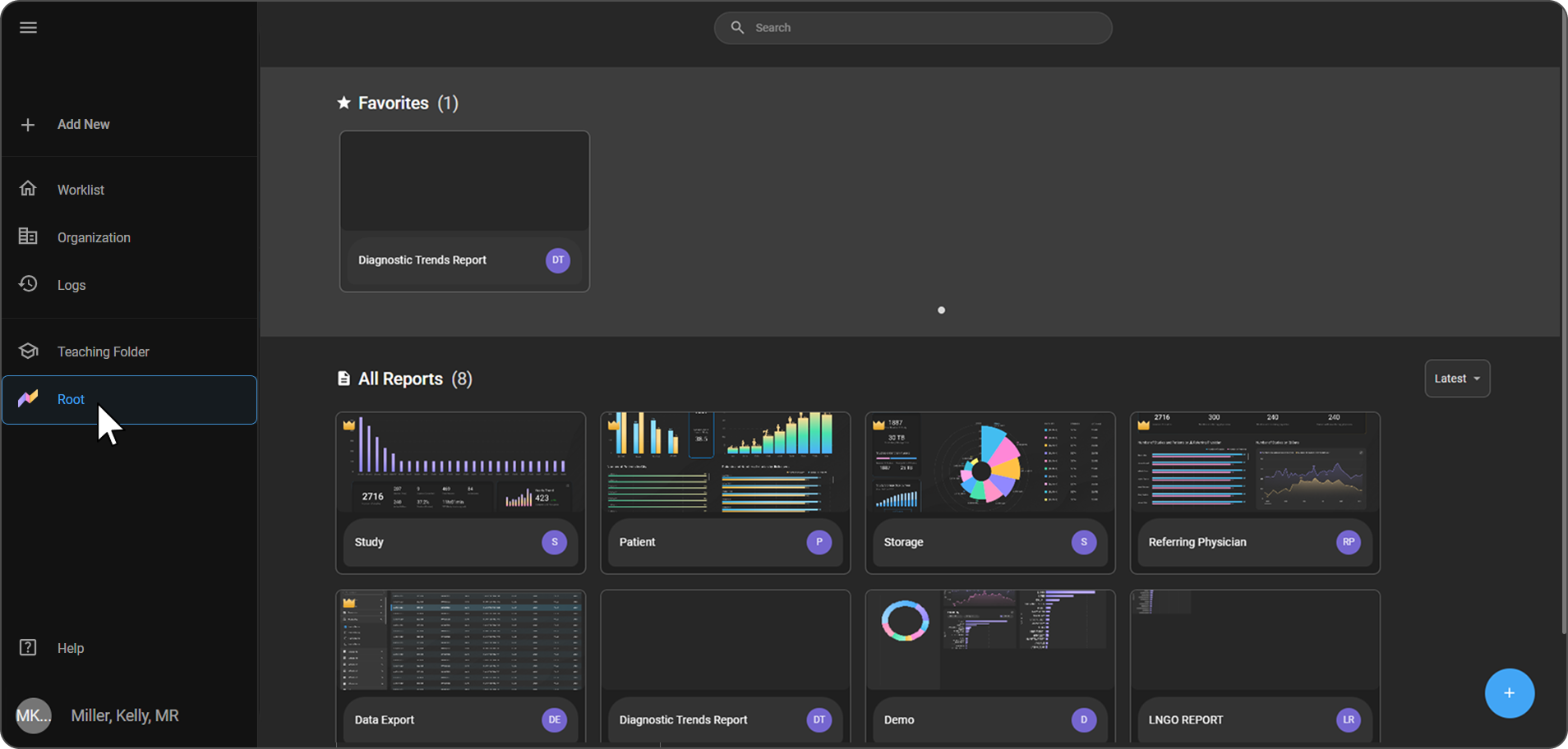
apps removal


3. Blume Forms Accessed via Organization

What changed:

Blume Forms configuration is now accessed through the Organization settings panel under Forms → Blume Forms, rather than through a separate Blume app tile.

Benefit:

Centralizes Blume configuration within the Organization settings, making it easier to manage alongside other organizational settings.
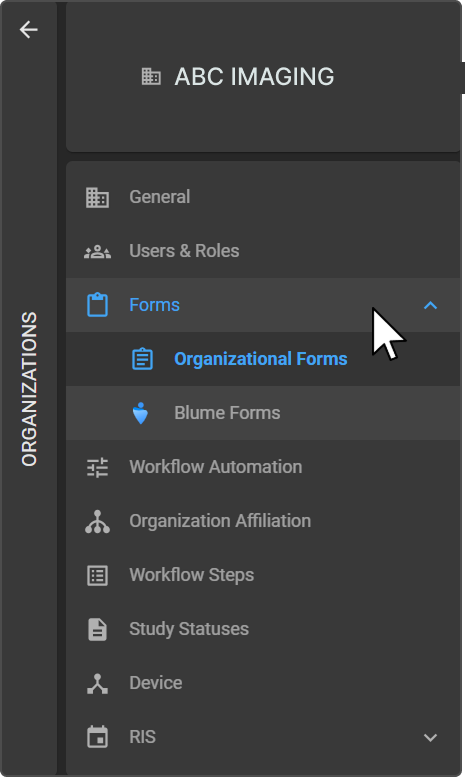
apps removal


Important Notes

  • The My Apps app switcher is no longer available in the interface.
  • Users previously accessing Root analytics via the app tile should now use the Root item in the left sidebar.
  • Blume Forms configuration options remain fully available under Organization → Forms → Blume Forms.

Where to Find It

FeatureNew Navigation Path
Root AnalyticsLeft Sidebar → Root
Blume FormsLeft Sidebar → OrganizationFormsBlume Forms

Updated Help Articles

Product Update: Workflow Automation Email Templates (Blume)

· Leitura de 2 minutos

Overview

We’re pleased to announce enhancements to the Email Template feature in Workflow Automation (WFA) for Blume. These updates are designed to simplify template management, improve usability, and provide greater flexibility in patient communications.

What's New

1. Enhanced User Experience

What changed:

The Email Template interface has been redesigned with a structured grid-based layout, replacing the earlier tile view.

Benefit:

Templates are easier to browse, compare, and manage within workflows.

2. Improved Template Management

What changed:

Users can now seamlessly create, edit, activate, deactivate, and reuse email templates directly within a workflow.

Benefit:

Templates support common patient communication scenarios such as appointment confirmations, cancellations, invitations, and notifications — all within a single workflow.

3. Flexible Customization & Branding

What changed:

Email content is fully customizable using an enhanced editor, allowing organizations to format text and adjust layouts.

Benefit:

Organizations can align emails with their branding and communication standards for a consistent patient experience.

4. Reply-To Email Configuration

What changed:

A configurable Reply-To option allows organizations to route patient responses to a preferred email address.

Benefit:

When disabled, system-managed footer messaging clearly indicates that the email is auto-generated, ensuring transparent patient communication.

Important Notes

  • Templates can be activated or deactivated but cannot be permanently deleted once in use within a workflow.
  • The Reply-To configuration is optional; when not set, the system auto-generated disclaimer appears in the email footer.
  • Email Templates are specific to the Blume platform within Workflow Automation and are not shared across other OmegaAI modules.

Where to Find It

Navigation path in the application:

Workflow Automation → Email Templates

Updated Help Articles

Email Templates in Workflow Automation (Blume)