Pular para o conteúdo principal

Product: RIS Procedure Codes & Order Sets

· Leitura de 2 minutos

Overview​

This release introduces enhancements to RIS Procedure Codes and Order Sets in OmegaAI, aimed at improving usability, simplifying management, and maintaining data integrity across scheduling and study workflows.

What’s New​

1. Improved Interface for Procedure Codes and Order Sets​

What changed:​

The Procedure Codes and Order Sets pages have been redesigned with a cleaner and more intuitive layout for easier navigation and configuration.

Benefit:​

Users can locate and manage procedure configurations more efficiently, reducing the time required for daily administrative tasks.

2. Simplified Management​

What changed:​

Users can now easily create, edit, and filter Procedure Codes and Order Sets directly from the RIS Settings interface.

Benefit:​

This improves workflow efficiency and simplifies management of frequently used procedure configurations.

3. Safeguards for In-Use Items​

What changed:​

Procedure Codes or Order Sets that are already associated with existing studies cannot be deleted.

Benefit:​

This safeguard prevents accidental data loss while allowing administrators to deactivate items that are no longer required.

Important Notes​

  • Procedure Codes or Order Sets currently used in studies cannot be removed.
  • Administrators can deactivate them instead to maintain data integrity.

Where to Find It​

Navigation path in the application:

Admin → Organization → Open Organization → RIS → Procedure Codes / Order Sets

Use these sections to create, edit, and manage Procedure Codes and Order Sets for the selected organization.

Updated Help Articles​

These improvements make managing procedure codes and order sets more reliable and user-friendly, helping you maintain accurate and consistent study data.
Product: Scheduler Enhancements

· Leitura de 2 minutos

Overview​

This release introduces enhancements to the OmegaAI Scheduler, focused on improving scheduling accuracy, usability, and workflow efficiency.

What’s New​

1. Time Display During Drag and Drop​

What changed:​

When dragging a study from the worklist to the scheduler, the exact time slot is displayed within each cell.

Benefit:​

This provides clearer visibility when selecting appointment times and reduces scheduling errors.

2. Modality Mismatch Indicator​

What changed:​

A validation indicator appears when there is a mismatch between the study modality and the healthcare service modality.

Benefit:​

This helps prevent incorrect scheduling and ensures studies are assigned to appropriate services.

3. Customizable Scheduler Time Intervals​

What changed:​

Scheduler intervals can now be configured to 5, 10, 15, or 30 minutes, providing greater flexibility to match scheduling needs.

Benefit:​

Administrators can adjust scheduling intervals to match clinical workflow requirements.

4. Quick View Options​

What changed:​

Users can quickly switch between Day, Week, and Month views directly from the scheduler interface.

Benefit:​

This improves visibility and allows faster navigation between scheduling views.

5. Reorder Healthcare Services with Drag and Drop​

What changed:​

Healthcare services can now be reordered using drag-and-drop within the scheduler.

Benefit:​

Users can personalize the scheduler layout for easier access to frequently used services.

Important Notes​

  • These enhancements will be rolled out within one week of the release.

Where to Find It​

Main Navigation → Calendar (right-side navigation bar)

Click the Calendar icon to open the Scheduler, where you can view and manage appointments, resources, and healthcare services.

Updated Help Articles​

log in here

Product: Organization Affiliation

· Leitura de 2 minutos

Overview​

This release introduces the Organization Affiliation feature in OmegaAI, focused on enabling secure, role-based access across organizations while maintaining auditability and interoperability standards.

We’re excited to introduce the Organization Affiliation feature — enabling secure, role-based access for users from participating organizations to studies in a primary organization.

What’s New​

1. One-Way Access Control​

What changed:​

Affiliate organization users can access studies from the primary (main) organization, but access is not reciprocal.

Benefit:​

Ensures controlled data sharing while maintaining strict access boundaries.

2. Role Mapping Between Organizations​

What changed:​

Roles can be mapped between organizations, or a single role can be applied to all affiliate users.

Benefit:​

Provides flexibility in access control and simplifies user permission management.

3. Affiliated Users View​

What changed:​

A dedicated view allows administrators to manage and track users from affiliated organizations who have access.

Benefit:​

Improves visibility and simplifies administration of cross-organization users.

4. Audit-Backed Management​

What changed:​

Affiliations can be created, edited, or removed with full audit traceability.

Benefit:​

Enhances compliance, accountability, and governance.

5. FHIR-Compliant Architecture​

What changed:​

The feature is built on the FHIR OrganizationAffiliation resource.

Benefit:​

Ensures interoperability and alignment with healthcare data standards.

Important Notes​

  • Access is strictly one-way from affiliate organizations to the primary organization.
  • Role mapping must be configured to ensure appropriate access levels.
  • All affiliation actions are audit-tracked.
  • The feature aligns with FHIR standards for interoperability.

Where to Find It​

You can access Organization Affiliation settings within the administrative configuration module.

Navigation path in the application: Admin → Organization Settings → Organization Affiliation

Updated Help Articles​

Organization Affiliation

Product: Improved Report Amendment Workflow

· Leitura de 2 minutos

Overview​

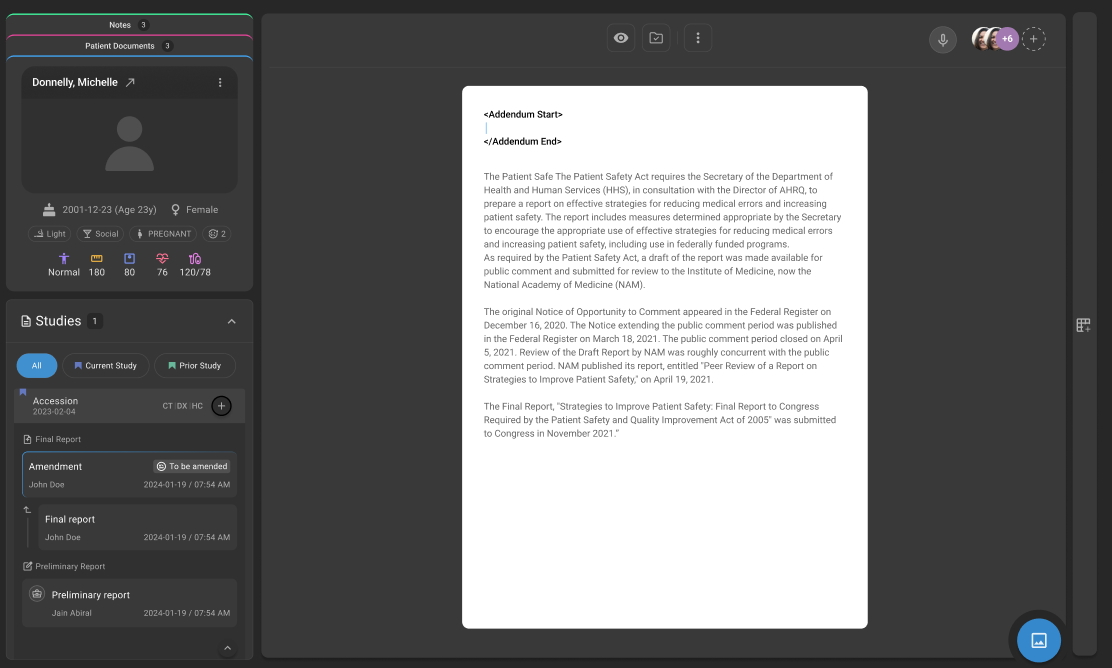
This release introduces updates to the Report Amendment Workflow in OmegaAI to improve usability, efficiency, and system reliability. This updated workflow introduces a safer, role-based workflow where all amendments are made on a copy of the signed report, with auto-inserted addendum tags and clear approval flow between users. Amendment phase-2

What’s New​

1. Amendment on Report Copy with Addendum Tagging​

What changed:​

Amendments are now performed on a copy of the signed report instead of modifying the original. Addendum Start and End tags are automatically inserted during the amendment process.

Benefit:​

Ensures audit integrity by preserving the original report while clearly identifying amended content through automatic tagging—improving clarity, standardization, and overall amendment handling.

2. Role-Based Amendment Workflow​

What changed:​

Amendment actions are now controlled based on user roles:

  • Reading Physician can amend directly
  • Non-Reading Physician can request amendments
  • Report Owner can accept or reject amendment requests
Benefit:​

Introduces better control and accountability, ensuring only authorized users can perform or approve amendments.

3. Structured Status Transitions​

What changed:​

Defined status transitions have been introduced:

  • Signed → To Be Amended (when amendment starts)
  • To Be Amended → Signed or Amended (after completion, based on workflow configuration)
Benefit:​

Provides clear visibility into amendment stages, improving tracking and workflow transparency.

Important Notes​

  • Original signed reports cannot be edited directly; all amendments are performed on a copy
  • Addendum tags are system-generated and cannot be manually removed
  • Amendment actions are restricted based on user roles and permissions
  • Final status may vary based on configured workflow (Signed or Amended)

Where to Find It​

Navigation path in the application:

Image Viewer → Embedded Document Viewer (EDV) → Final Report → Amend

Amendment status transitions (Signed → To Be Amended → Signed/Amended) are reflected within the report workflow in EDV.

Updated Help Articles​

Amendment workflow

Product: Revamped Info Pages

· Leitura de 2 minutos

Overview​

This release introduces updates to the Info Pages in OmegaAI, focused on improving usability, navigation, and structured access to patient-related information. With this enhancement, the interface has been streamlined, and accessibility to Order and Study details has been improved. A new Visit section has been introduced to organize Orders, establishing a clear hierarchy: Visit → Order → Study.

Revamped Info Pages

What’s New​

1. Introduction of Visit Hierarchy​

What changed:​

A new Visit section has been introduced, restructuring the data hierarchy to: Visit → Order → Study.

Benefit:​

Provides a more logical, clinically aligned organisation of patient data, improving navigation and context.

2. Visit Section with Enhanced Details​

What changed:​

The Visit section now includes comprehensive details, including Visit Date/Time, Patient Vitals, Accident Notes, Special Courtesy, and Visit Class (e.g., Inpatient, Outpatient).

Benefit:​

Offers a centralized view of patient visit information, reducing the need to navigate across multiple sections.

3. Reassign Orders Across Patients​

What changed:​

Users can now reassign an Order to a different patient by searching and selecting the correct patient. All associated studies and orders can be moved from one patient to another.

Benefit:​

Improves data accuracy and reduces administrative effort in correcting patient-order mismatches.

4. Improved Study Navigation​

What changed:​

Users can view all studies under an Order and access individual Study details by selecting study tiles.

Benefit:​

Simplifies access to study-level information and improves workflow efficiency.

5. Quick Access Panel on Study Page​

What changed:​

A Quick Access panel has been added to the Study page, providing direct access to Image Viewer, Document Viewer, Prior Authorization, and Post Charge actions.

Benefit:​

Reduces navigation steps and enables faster execution of key actions.

Important Notes​

  • The updated hierarchy (Visit → Order → Study) is now the standard structure across Info Pages.
  • Reassigning an Order will move all associated studies to the selected patient.
  • Existing workflows may require minor adaptation to align with the new navigation structure.

Where to Find It​

You can access the updated Visit, Order, and Study information from the Patient Info pages within OmegaAI.

Navigation path in the application: Patient → Info → Visit → Order → Study

Updated Help Articles​

New Info Pages.

Product: Revamped Patient Page

· Leitura de 2 minutos

Overview​

This release introduces updates to the Patient Page in OmegaAI, focused on improving usability, accessibility, and workflow efficiency.

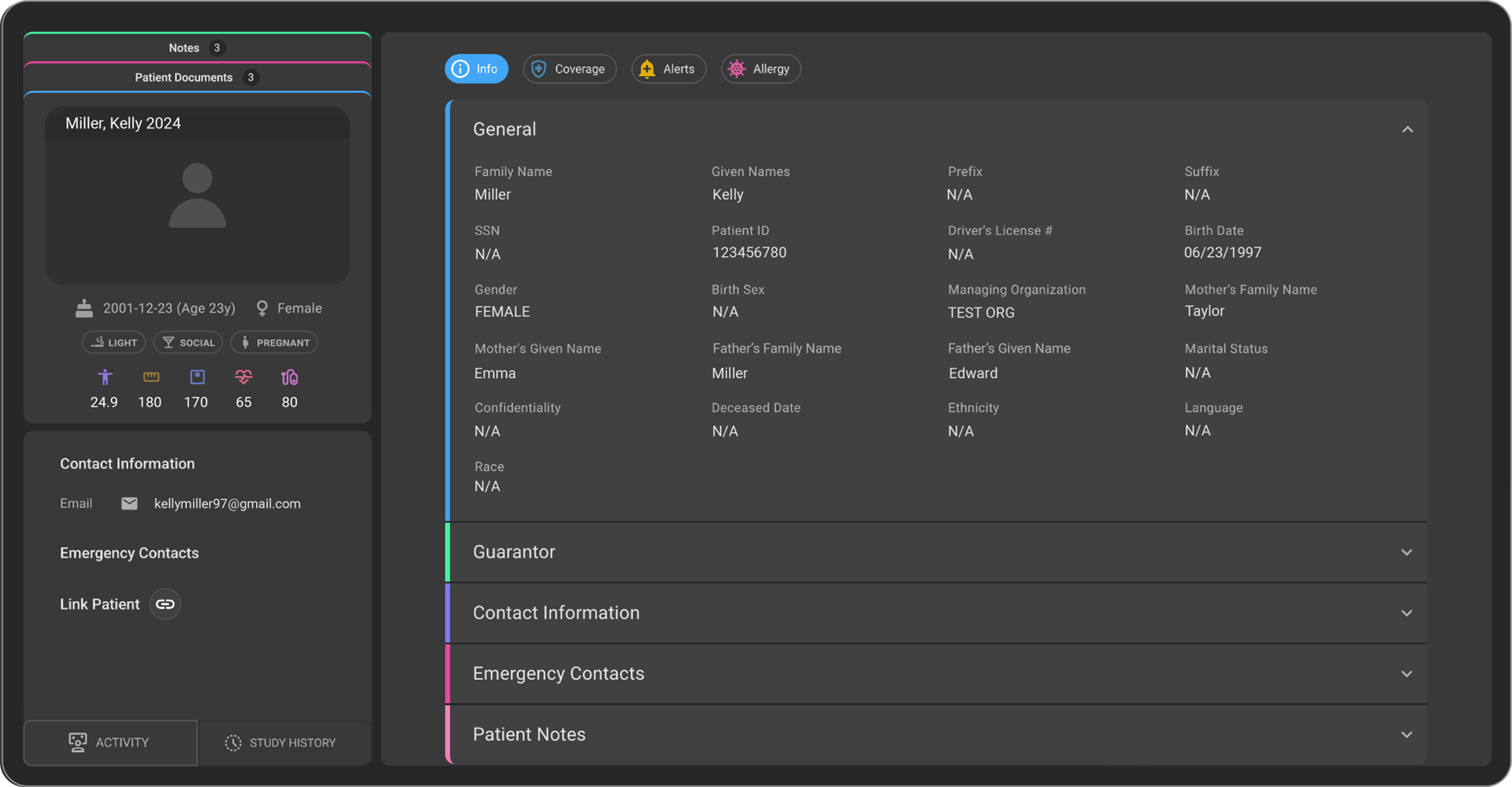
We are excited to announce the launch of the revamped Patient Page, crafted for a more intuitive and efficient user experience. This update brings enhanced accessibility, a streamlined interface, and new functionalities designed to optimize workflows.

Revamped Patient Page

What’s New​

1. General Section​

What changed:​

All basic patient details such as Name, Gender, Date of Birth (DOB), SSN, etc., are available within this section.

Benefit:​

Provides a centralized view of essential patient information for quick and easy access.

2. Guarantor Section​

What changed:​

Users can now add guarantor details for the patient. A guarantor refers to a person who agrees to repay a patient’s medical bills if the patient is unable to pay.

Benefit:​

Ensures financial responsibility details are captured and managed efficiently.

3. Contact Information Section​

What changed:​

The Contact Information section has been moved under the Info tab for easier accessibility. Users can add, edit, and delete multiple email IDs and contact numbers.

Benefit:​

Improves accessibility and flexibility in managing patient contact details.

4. Emergency Contacts Section​

What changed:​

Users can add emergency contact details for the patient.

Benefit:​

Ensures critical contact information is readily available when needed.

5. Patient Notes Section​

What changed:​

Users can add, edit, and delete multiple patient notes.

Benefit:​

Supports better documentation and tracking of patient-specific information.

6. Coverage Section​

What changed:​

Users can add, edit, and delete multiple coverage details for the patient.

Benefit:​

Enables comprehensive management of patient coverage information.

Important Notes​

  • The Patient Page interface has been streamlined for improved usability.
  • Multiple entries are supported for Contact Information, Patient Notes, and Coverage.
  • Contact Information is now accessible under the Info tab.
  • Guarantor details can be added for financial responsibility tracking.

Where to Find It​

You can access the revamped Patient Page from the Patient module in OmegaAI.

Navigation path in the application: Patient → Info → Patient Page

Updated Help Articles​

Managing Patient Record

Atualização de Produto: Evite Relatórios Concorrentes (Indicador de Acesso ao Relatório)

· Leitura de um minuto
Veena Hegde
Product Manager

Estamos animados em anunciar o lançamento do novo recurso Evite Relatórios Concorrentes, uma melhoria simples, porém poderosa, projetada para aumentar a visibilidade e a coordenação entre radiologistas e clínicos que trabalham em relatórios.

🔹 O que é?​

O Indicador de Acesso ao Relatório mostra em tempo real quando alguém está visualizando ou editando um relatório. Isso ajuda a reduzir conflitos, confusão e esforços duplicados quando vários usuários acessam o mesmo relatório.

💡Principais Destaques:

Indicador em Tempo Real: Veja facilmente quem está visualizando ou editando o relatório ativamente.

Colaboração Aprimorada: Previna sobrescritas acidentais e garanta transições suaves.

Maior Eficiência: Reduz comunicações desnecessárias e suposições sobre o status do relatório.

Para mais informações sobre este recurso no OmegaAI, veja Indicador de acesso ao relatório

Atualização de Produto: Autoagendamento com Seleção de Conjunto de Pedidos

· Leitura de 2 minutos
Product Manager

Estamos animados em anunciar uma melhoria significativa: Pacientes agora podem agendar consultas diretamente pelo Blume utilizando a Seleção de Conjunto de Pedidos integrada!

O que há de novo?​

Autoagendamento com Conjunto de Pedidos​

Pacientes podem agendar consultas de forma simples, selecionando o Conjunto de Pedidos relevante diretamente no Blume. Este processo intuitivo agora está alinhado com a experiência existente do nosso portal de Autoagendamento.

Passo 1:

Passo 2:

Conjuntos de Pedidos Totalmente Personalizáveis​

Centros de imagem podem personalizar completamente os conjuntos de pedidos, definindo recursos de saúde disponíveis, convenções de nomenclatura específicas e capacidades de autoagendamento adaptadas às necessidades individuais de sua prática.

Preenchimento Automático Conveniente da Organização​

Se um paciente já agendou uma consulta anteriormente, os detalhes relevantes da organização agora serão preenchidos automaticamente, tornando sua experiência de agendamento ainda mais ágil.

Funcionalidades Existentes​

Upload de Documentos do Paciente​

Pacientes continuam podendo fazer upload dos documentos necessários, como pedidos médicos, diretamente no Blume. Os documentos enviados permanecem facilmente acessíveis para os centros de imagem realizarem uma revisão rápida.

Formulários Integrados para Pacientes​

Centros de imagem mantêm a capacidade de habilitar formulários específicos para que os pacientes preencham durante o processo de solicitação de consulta, garantindo uma coleta de informações completa e precisa.

Para mais informações, consulte Buscar Procedimento de Imagem & Solicitar Novo Agendamento.

Atualização de Produto: Prontuário do Paciente

· Leitura de um minuto
Veena Hegde
Product Manager

Estamos animados em anunciar o novo recurso Prontuário do Paciente, projetado para simplificar o acesso às informações e documentos do paciente.

🔹 O que há de novo?​

Cartão do Paciente: Exibe detalhes essenciais e dados vitais do paciente para referência rápida.
Documentos do Paciente: Veja todos os documentos enviados (por pacientes ou técnicos) e faça upload de novos documentos diretamente. Acesse facilmente o formulário de cadastro do paciente sem navegação extra.
Visualização Dividida: Visualize documentos do paciente lado a lado de forma prática, aumentando a eficiência do fluxo de trabalho.

Para informações sobre o Prontuário do Paciente no OmegaAI, veja Prontuário do Paciente

Atualização de Produto: Aprimoramento da Busca por Comando de Voz

· Leitura de um minuto
Mahdi Keyhani
Director of Product

Estamos empolgados em apresentar uma nova atualização para melhorar a experiência com Comando de Voz. Com esse aprimoramento, os usuários agora podem localizar e gerenciar comandos de forma eficiente, tornando os fluxos de trabalho mais intuitivos e ágeis.

🔹 O que há de novo?​

  • 🔍 Funcionalidade de Busca – Agora os usuários podem buscar comandos de voz específicos, eliminando a necessidade de rolar manualmente a lista.
  • ✏️ Edite Comandos Diretamente – Após encontrar um comando, é possível modificá-lo instantaneamente para maior flexibilidade.
  • 🚀 Acessibilidade Aprimorada – Acesse rapidamente as ferramentas e comandos que você precisa, otimizando a eficiência.

Para informações sobre comandos de voz no OmegaAI, consulte Reconhecimento de Voz e Funcionalidades de Comando de Voz