Flujo de afiliación de la organización remitente
El marco de afiliación de la organización remitente en OmegaAI (OAI) permite a las organizaciones primarias establecer relaciones con organizaciones externas, al tiempo que se mantiene un control centralizado sobre los permisos y el acceso de los usuarios.
Esta mejora introduce:
- Creación autónoma de organizaciones remitentes
- Configuración automática de la afiliación
- Gestión de roles basada en la interfaz gráfica de usuario (GUI) para los usuarios remitentes afiliados
Tipos de organización
OmegaAI admite dos tipos de organización dentro del marco de afiliación de organizaciones remitentes.
| Tipo de organización | Finalidad |
|---|---|
| Organización principal | Organización que administra actualmente OmegaAI |
| Organización de derivación | Organización cuyos médicos derivan pacientes y estudios |
| Organización de derivación afiliada | Organización de derivación conectada a través del marco de afiliación |
| Organización de derivación no afiliada | Organización cuya afiliación se ha eliminado |
Creación de una organización de derivación
Los administradores pueden crear una organización remitente directamente desde el flujo de trabajo de afiliación sin salir de la página actual. De este modo, se evita la necesidad de realizar procesos de configuración independientes.
Navegación
-
Administración → Organizaciones → Afiliaciones
-
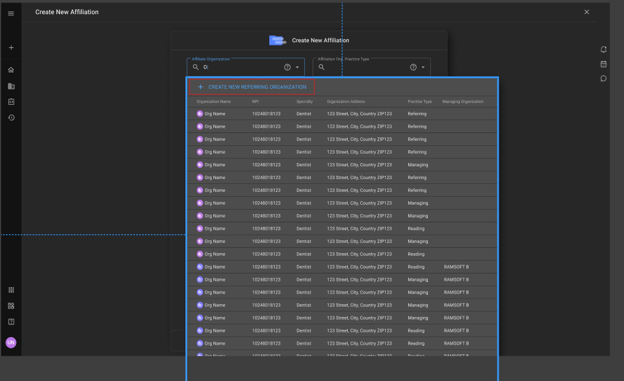
Seleccione Crear nueva organización remitente
Creación de una organización remitente
Los administradores deben proporcionar:
-
Información obligatoria:
- Nombre de la organización
-
Información adicional (cuando existen nombres duplicados):
- Número NPI
- Dirección
Detección de organizaciones duplicadas
Si el nombre de la organización introducido ya existe en OmegaAI:
El sistema amplía automáticamente los campos adicionales.
La información requerida pasa a ser:
- Nombre de la organización
- NPI
- Dirección
Esto permite a los administradores distinguir entre organizaciones que comparten nombres similares.
Proceso de creación de la organización
Tras la creación satisfactoria, OmegaAI realiza automáticamente lo siguiente:
- Crea la Organización de referencia
- La afilia a la Organización principal
- La hace visible inmediatamente en la interfaz de usuario de afiliación
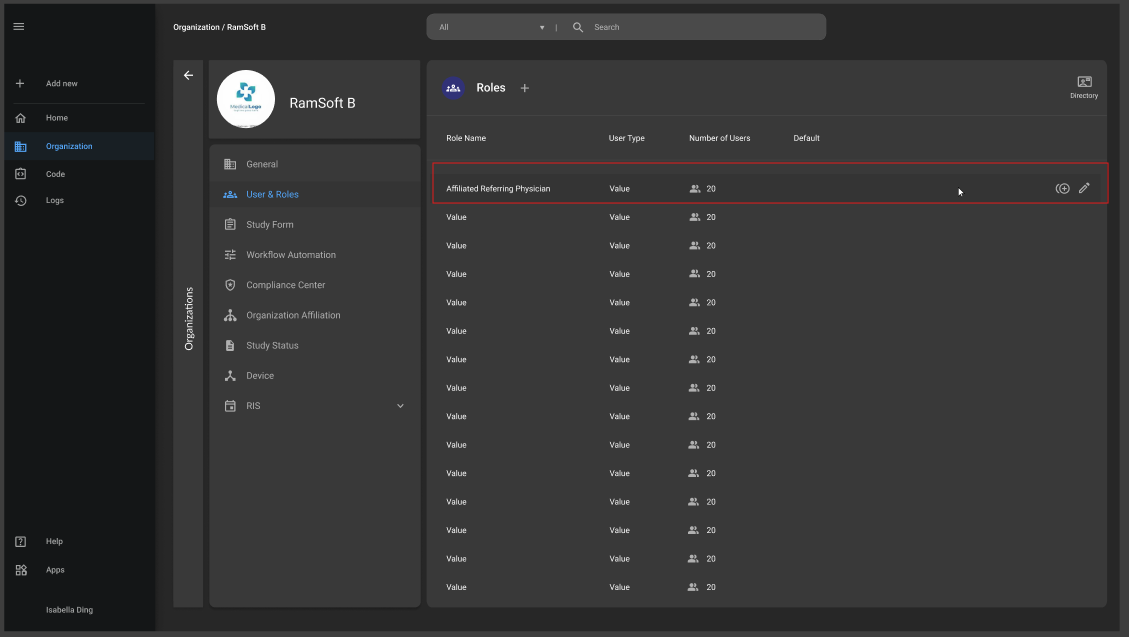
- Crea el rol de la interfaz gráfica de usuario: MÉDICO DE REFERENCIA AFILIADO
- Asigna a los usuarios afiliados a este rol
Rol de MÉDICO REMITENTE AFILIADO
Históricamente, los médicos remitentes solo heredaban el acceso de su organización remitente. No existía la posibilidad de personalizar los permisos. El nuevo rol introduce una gestión granular de los permisos.
Comportamiento predeterminado del rol
Nombre del rol:
MÉDICO REMITENTE AFILIADO
Características:
- Control de acceso de usuarios basado en la interfaz gráfica de usuario (GUI)
- Permisos editables
- Personalización específica para cada organización
- Disponible dentro de la organización principal
Permisos iniciales
El rol se crea inicialmente como una copia exacta del rol predeterminado heredado de «Médico remitente». Se copian todos los controles de acceso de usuario existentes. Los administradores pueden personalizar posteriormente los permisos de acuerdo con los requisitos de la organización.
Ejemplos:
- Ver estudios
- Ver informes
- Descargar estudios
- Compartir estudios
- Imprimir informes
- Permisos de mensajería
- Visibilidad en el portal
Asignación de roles
Las organizaciones remitentes solo admiten un rol.
| Tipo de organización | Asignación de roles |
|---|---|
| Organización remitente | No requerido |
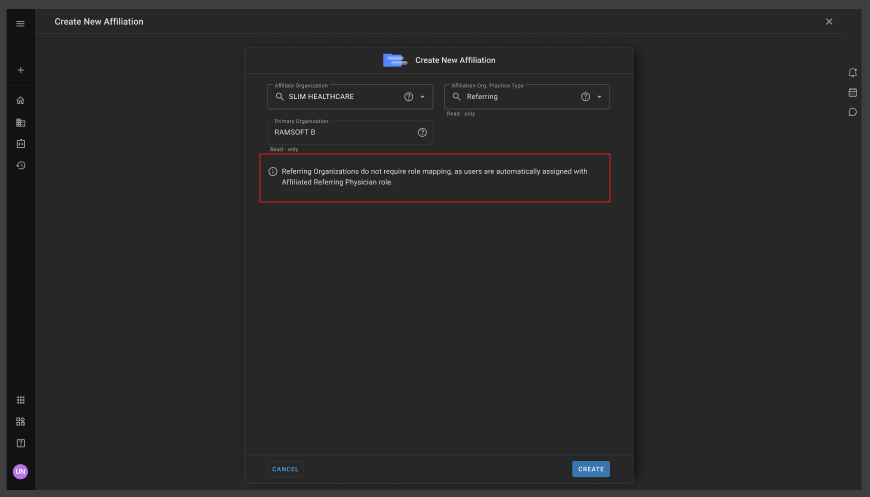
Gestión de la afiliación
Afiliación automática
Las organizaciones de referencia de nueva creación se afilian automáticamente. Los administradores no necesitan realizar ninguna configuración adicional. La afiliación se hace visible de inmediato.
Estado:
AFILIADA
Visibilidad de la afiliación
Solo las organizaciones afiliadas muestran opciones de gestión.
| Acción | Afiliada | No afiliada |
|---|---|---|
| Estado | Sí | No |
| Icono de usuarios | Sí | No |
| Icono de detalles | Sí | No |
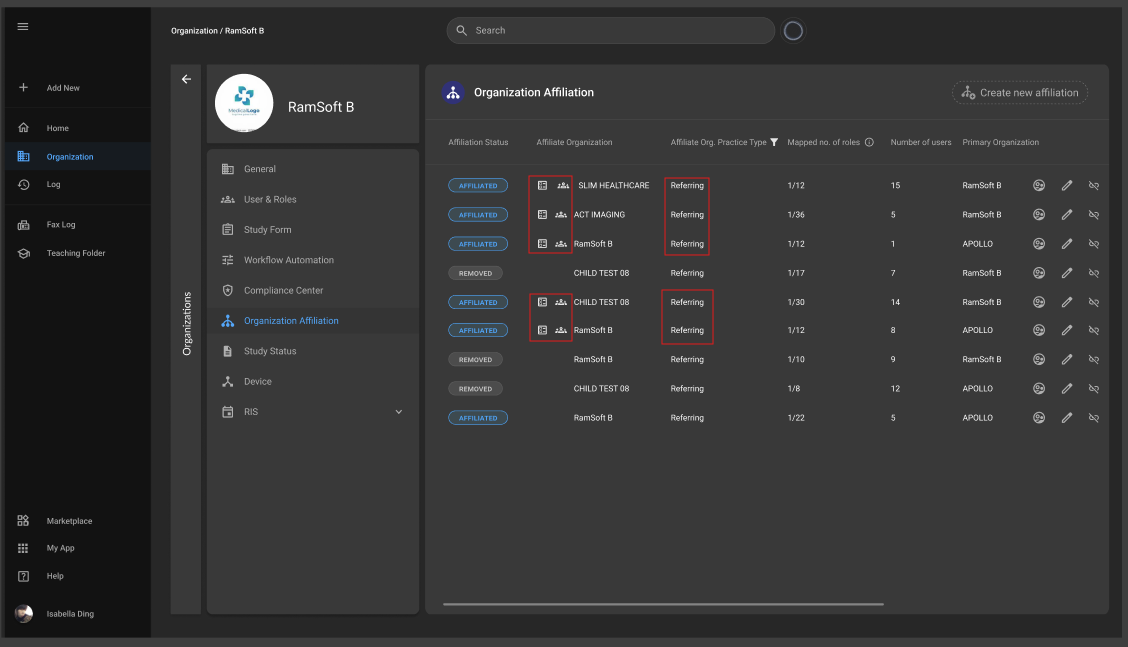
Icono de usuarios
Permite a los administradores:
- Ver los usuarios afiliados
- Gestionar los usuarios afiliados (creación de nuevos usuarios de referencia)
Icono de detalles
Muestra información sobre la organización, incluyendo:
- Nombre de la organización
- NPI
- Dirección
- Tipo de organización
Eliminación de afiliaciones
Las organizaciones pueden pasar de estar afiliadas a no estarlo. Cuando se elimina una afiliación:
El estado pasa a ser:
ELIMINADA
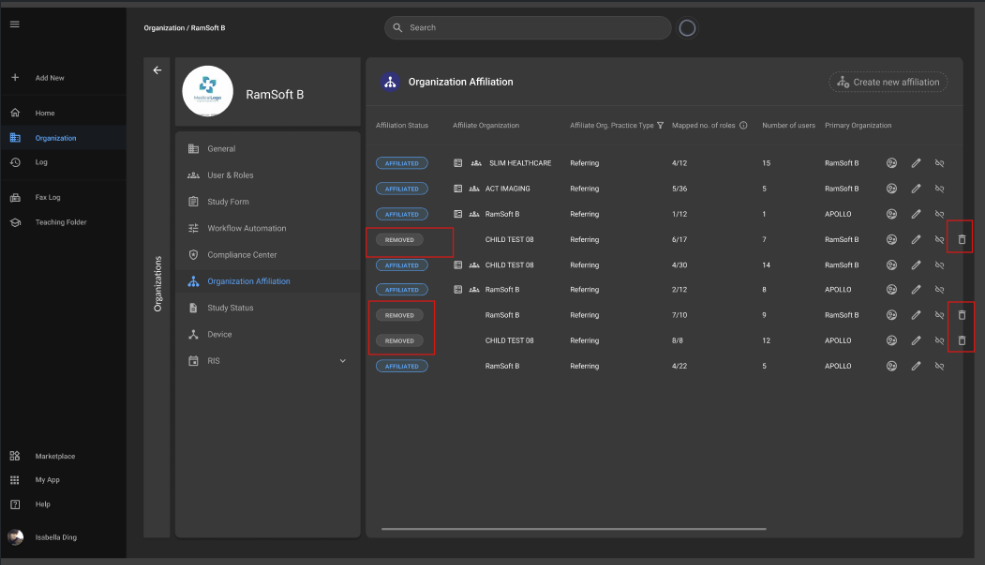
Comportamiento tras la eliminación de la afiliación
Quedan ocultas las siguientes acciones:
- Icono de usuarios
- Icono de detalles de la organización
Los administradores pueden eliminar definitivamente estas afiliaciones.
Eliminar afiliación
La opción Eliminar solo está disponible para:
- Organizaciones de referencia no afiliadas
Cuadro de diálogo de confirmación
Eliminar afiliación
Mensaje
¿Está seguro de que desea eliminar definitivamente esta afiliación eliminada?
Nota
La eliminación de esta afiliación la eliminará definitivamente del sistema y no podrá recuperarse posteriormente.
Botones:
- Eliminar
- Cancelar
Preguntas frecuentes
-
¿Por qué se introdujo el rol de «MÉDICO REMITENTE AFILIADO»?
Para proporcionar a los administradores una gestión detallada de permisos basada en la interfaz gráfica de usuario (GUI) para los médicos remitentes.
-
¿Admite una organización remitente varios roles?
No. Las organizaciones remitentes solo admiten un rol: MÉDICO REMITENTE AFILIADO
-
¿Es necesaria la asignación de roles para las organizaciones remitentes?
No. La asignación de roles solo es necesaria para las organizaciones de diagnóstico por imagen.
-
¿Qué ocurre si se elimina una afiliación?
La organización deja de estar afiliada. Los iconos de «Usuarios» y «Detalles» desaparecen, y los administradores pueden eliminar la afiliación de forma permanente.
-
¿Se pueden recuperar las afiliaciones eliminadas?
No. La eliminación es permanente y no se puede deshacer.